The Best Fluffy Pancakes recipe you will fall in love with. Full of tips and tricks to help you make the best pancakes.
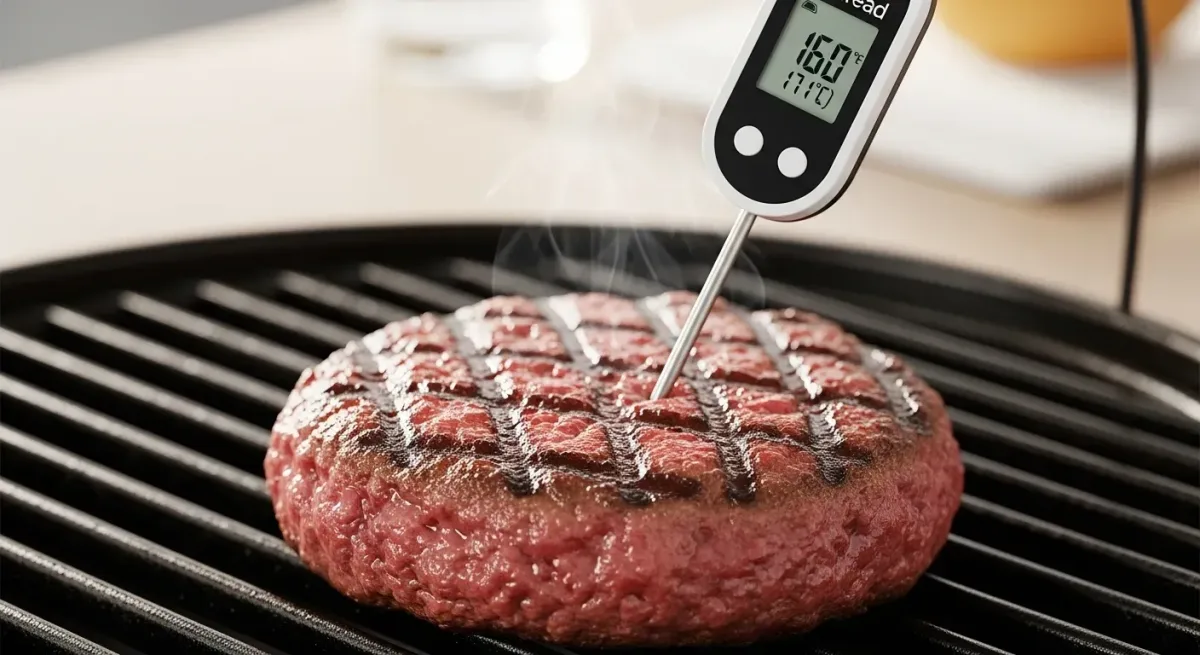
Why Your Ground Beef Thermometer Might Be Lying to You (And How to Fix It)
Let me tell you about the time I nearly served undercooked burgers at a pop-up dinner in Nashville. It was 2023, the kitchen was sweltering, and my digital thermometer, my supposedly trusty sidekick, flashed 155°F when I knew damn well the patty wasn’t there yet. Turns out, I’d dropped it a week earlier and never checked the calibration. That’s the night I learned two things: 1) Nashville’s health inspector has a sixth sense for food safety violations, and 2) a thermometer is only as good as its last calibration.
If you’re reading this, you probably already know that ground beef safety isn’t just about slapping a patty on the grill and hoping for the best. The USDA’s 160°F minimum internal temperature for ground beef exists for a reason, E. coli, Salmonella, and other pathogens don’t care about your medium-rare preferences. But here’s the kicker: even the fanciest thermometer can drift out of accuracy over time. Dropped it? Left it in a hot car? Used it to stir a pot of chili? Congrats, you might as well be guessing temperatures with a Magic 8-Ball.
This guide isn’t just about how to calibrate your thermometer, though we’ll cover that in excruciating detail. It’s about understanding why calibration matters, how often you should do it, and what to do when your thermometer is giving you the culinary equivalent of side-eye. By the end, you’ll know how to turn that sketchy $10 probe from Amazon into a precision tool worthy of a Michelin-starred kitchen. Let’s dive in.
The Uncomfortable Truth About Thermometer Accuracy
Why Ground Beef Is the Riskiest Meat in Your Kitchen
Ground beef isn’t just beef that’s been through a grinder. It’s a pathogen playground. When you grind meat, you’re essentially taking bacteria that was safely on the surface (where heat kills it quickly) and mixing it throughout the entire batch. That’s why a rare steak can be safe, but a rare burger is a gamble with your digestive system. The USDA’s 160°F rule isn’t arbitrary, it’s the temperature at which harmful bacteria like E. coli O157:H7 are statistically unlikely to survive.
But here’s where things get messy: if your thermometer is off by even 2°F, you could be serving burgers at 158°F and thinking you’re in the clear. That’s a 2°F margin that could mean the difference between a juicy burger and a trip to the ER. I’ve seen chefs argue that “close enough” is fine, but let me ask you this: would you play Russian roulette with a revolver that has 98% of its chambers empty? Didn’t think so.
How Thermometers Lie (And Why You Shouldn’t Trust Them Blindly)
Thermometers drift. It’s a fact of life, like how your car’s alignment gets wonky after hitting a pothole. Here are the most common ways your thermometer might be betraying you:
- Physical trauma: Dropped it? Banged it against a pot? That little probe is more delicate than it looks. Even a minor impact can throw off the internal sensor.
- Extreme temperatures: Left it in a hot car? Stored it near the oven? Thermometers are calibrated to work within a specific range, and pushing those limits can cause permanent damage.
- Battery issues: Low batteries don’t just dim the display, they can cause erratic readings. If your thermometer is acting like it’s had one too many espressos, check the battery first.
- Age: Even the best thermometers have a lifespan. Over time, the sensor can degrade, leading to slow response times or inaccurate readings.
- User error: Let’s be honest, how many of us actually read the manual? Improper insertion depth, testing in the wrong part of the meat, or not giving the thermometer enough time to stabilize can all lead to bad readings.
I’ll admit, I used to be one of those chefs who assumed their thermometer was accurate just because it was expensive. Then I bought a $200 Thermoworks Thermapen and compared it to a $15 Taylor instant-read I’d had for years. The difference? A whopping 5°F. That’s when I realized that blind trust is a recipe for disaster.
Thermometer Types: Which One Are You Using (And Is It the Right One?)
Not all thermometers are created equal. Before you can calibrate yours, you need to know what kind you’re dealing with. Here’s a quick breakdown of the most common types used in commercial and home kitchens:
1. Instant-Read Thermometers (The Workhorse)
These are the ones you see chefs jabbing into steaks on cooking shows. They give a reading in 2-5 seconds and are designed to be used quickly and frequently. Examples include the Thermoworks Thermapen and the Taylor Precision Products digital thermometer.
Pros:
- Fast and convenient
- Portable and easy to use
- Most models are affordable
Cons:
- Not designed for continuous monitoring (e.g., leaving it in a roast while it cooks)
- Can be fragile if dropped
- Battery life can be an issue if left on
2. Probe Thermometers (The Long-Haul Player)
These have a cable that connects the probe to a base unit, allowing you to monitor temperatures without opening the oven or grill. They’re great for smoking briskets or slow-cooking roasts. Examples include the ThermoPro TP20 and the Meater+.
Pros:
- Can be left in food during cooking
- Some models have wireless connectivity
- Great for large cuts of meat
Cons:
- More expensive than instant-read thermometers
- Cables can be a hassle in a busy kitchen
- Probes can be damaged if not stored properly
3. Dial Thermometers (The Old-School Classic)
You’ve seen these in meat cases at the grocery store. They have a analog dial and are often built into grilling tools like forks or spatulas. Examples include the Taylor 5932 large-dial thermometer.
Pros:
- No batteries required
- Durable and long-lasting
- Easy to read from a distance
Cons:
- Slower response time (up to 30 seconds)
- Less accurate than digital models
- Can be affected by ambient temperature
4. Infrared Thermometers (The Non-Contact Option)
These measure surface temperatures without touching the food. They’re great for checking grill grates or skillet temperatures, but they’re useless for checking internal temperatures of ground beef. Examples include the Etekcity Lasergrip 774.
Pros:
- Fast and non-contact
- Great for checking surface temperatures
- No cross-contamination risk
Cons:
- Cannot measure internal temperatures
- Accuracy can be affected by shiny or reflective surfaces
- Not suitable for ground beef safety
For ground beef safety, instant-read and probe thermometers are your best bets. Dial thermometers can work in a pinch, but they’re less accurate and slower. Infrared thermometers? Save them for checking your grill’s temperature, not your burgers.
How Often Should You Calibrate Your Thermometer?
This is where things get a little murky. There’s no one-size-fits-all answer, but here’s a general guideline based on how often you use your thermometer and what you’re using it for:
- Home cooks: Calibrate every 3-6 months, or immediately after dropping it or exposing it to extreme temperatures.
- Professional chefs: Calibrate weekly, or at least before each major service. In a busy restaurant, thermometers get knocked around, dropped, and abused daily.
- Food safety inspectors: Calibrate daily, or before each inspection. These folks can’t afford to be wrong.
But let’s be real, how many of us actually calibrate our thermometers that often? I’ll confess: before my burger incident, I went two years without calibrating my thermometer. Don’t be like me. Here’s a simple rule of thumb: If you can’t remember the last time you calibrated your thermometer, it’s time to do it.
Also, consider calibrating your thermometer in these scenarios:
- After any physical impact (e.g., dropping it, banging it against a pot)
- After exposure to extreme temperatures (e.g., left in a hot car, stored near the oven)
- If you notice inconsistent readings (e.g., it says 160°F but the meat is still pink)
- If the battery has been replaced or is running low
- Before a big cooking event (e.g., holiday dinner, catering gig, pop-up restaurant)
The Two Best Ways to Calibrate Your Thermometer
There are two primary methods for calibrating a thermometer: the ice water method and the boiling water method. Both are simple, but they test different temperature ranges. For ground beef safety, you’ll want to focus on the 160°F range, so the boiling water method is more relevant. That said, I recommend doing both to ensure your thermometer is accurate across the board.
Method 1: The Ice Water Method (For 32°F/0°C Accuracy)
This method tests your thermometer’s accuracy at the freezing point of water. It’s great for checking the lower end of the temperature spectrum, which is useful for refrigeration and cold holding.
What You’ll Need:
- A glass or bowl
- Crushed ice (or cubed ice, but crushed works better)
- Distilled or tap water
- Your thermometer
Steps:
- Fill the glass with ice: Use enough ice to fill the glass about 3/4 full. Crushed ice works best because it creates more surface area for the water to chill.
- Add water: Pour cold water over the ice until the glass is full. The water should just cover the ice. Stir gently to ensure the temperature is even throughout.
- Insert the thermometer: Place the probe into the ice water, making sure it’s submerged at least 2 inches (or as deep as the manufacturer recommends). Avoid touching the sides or bottom of the glass, as this can affect the reading.
- Wait for the reading to stabilize: This can take anywhere from 15 seconds to a minute, depending on your thermometer. Don’t rush it, patience is key.
- Check the reading: The thermometer should read 32°F (0°C). If it’s within ±2°F, it’s considered accurate. If it’s off by more than that, you’ll need to adjust it.
Troubleshooting:
- Reading too high? The ice might not be cold enough, or the water might not be fully mixed. Try stirring the ice water again and wait a few more seconds.
- Reading too low? This is rare, but it can happen if the thermometer is exposed to a cold draft or if the ice has started to melt significantly. Add more ice and try again.
- Thermometer won’t stabilize? This could be a sign of a dying battery or a faulty sensor. Try replacing the battery first. If that doesn’t work, it might be time for a new thermometer.
Method 2: The Boiling Water Method (For 212°F/100°C Accuracy)
This method tests your thermometer’s accuracy at the boiling point of water. Since ground beef needs to reach 160°F, this method is more relevant for ensuring your thermometer is accurate in the higher temperature range.
Important Note: The boiling point of water changes with altitude. At sea level, water boils at 212°F (100°C), but for every 500 feet above sea level, the boiling point drops by about 1°F. If you’re not at sea level, you’ll need to adjust your expectations. For example, in Denver (5,280 feet above sea level), water boils at 203°F.
What You’ll Need:
- A pot
- Water
- A stove or heat source
- Your thermometer
Steps:
- Boil the water: Fill the pot with water and bring it to a rolling boil. You want to see big, vigorous bubbles, this ensures the water is fully boiling.
- Insert the thermometer: Carefully place the probe into the boiling water, making sure it’s submerged at least 2 inches and not touching the sides or bottom of the pot. Be cautious, boiling water can cause burns!
- Wait for the reading to stabilize: This can take 15-30 seconds, depending on your thermometer. Again, don’t rush it.
- Check the reading: The thermometer should read 212°F (100°C) at sea level. If you’re at a higher altitude, use a boiling point calculator to determine the correct temperature for your location. If the reading is within ±2°F, your thermometer is accurate. If it’s off by more, you’ll need to adjust it.
Troubleshooting:
- Reading too low? The water might not be fully boiling. Make sure you see vigorous bubbles and that the pot is on high heat. Also, check that the thermometer isn’t touching the sides or bottom of the pot.
- Reading too high? This is rare, but it can happen if the thermometer is exposed to steam or if the pot is overheating. Try moving the pot to a cooler part of the stove and wait a few seconds.
- Thermometer won’t stabilize? This could be a sign of a faulty sensor or a dying battery. Try replacing the battery first. If that doesn’t work, it might be time for a new thermometer.
How to Adjust Your Thermometer (If It’s Off)
If your thermometer is off by more than ±2°F, you’ll need to adjust it. The process varies depending on the type of thermometer you have, so let’s break it down.
Adjusting a Digital Thermometer
Most digital thermometers have a calibration function built in. Here’s how to use it:
- Check the manual: This is the most important step. Different models have different calibration processes, so dig out that manual (or Google it).
- Enter calibration mode: This usually involves holding down a button (like the “CAL” or “MODE” button) for a few seconds. Some thermometers require you to press a sequence of buttons.
- Follow the prompts: The thermometer will guide you through the process. You’ll typically need to insert it into ice water or boiling water (depending on the method) and confirm the reading.
- Save the adjustment: Once you’ve confirmed the correct temperature, the thermometer will save the adjustment. Some models require you to press a button to confirm.
Example: For a Thermoworks Thermapen, you’d hold the “CAL” button for 3 seconds, then follow the on-screen prompts to calibrate using the ice water method.
If your digital thermometer doesn’t have a calibration function, you’re out of luck, it can’t be adjusted. In this case, you’ll need to mentally adjust your readings or replace the thermometer.
Adjusting a Dial Thermometer
Dial thermometers (like the ones built into grilling forks) usually have a small nut or screw on the back that you can turn to adjust the reading. Here’s how to do it:
- Test the thermometer: Use the ice water or boiling water method to determine how far off the thermometer is.
- Locate the adjustment nut: It’s usually on the back of the thermometer, near the base of the probe. You may need a small wrench or pliers to turn it.
- Adjust the reading: If the thermometer reads 30°F in ice water (instead of 32°F), you’ll need to turn the nut clockwise to increase the reading. If it reads 34°F, turn it counterclockwise to decrease the reading. Make small adjustments and retest until the reading is accurate.
- Retest: After adjusting, test the thermometer again to make sure it’s accurate. Repeat the process if necessary.
Pro Tip: Dial thermometers are less precise than digital ones, so don’t expect perfection. If you can get it within ±2°F, consider it a win.
What If Your Thermometer Can’t Be Adjusted?
If your thermometer doesn’t have a calibration function and can’t be adjusted manually, you have two options:
- Mentally adjust your readings: If your thermometer is consistently off by a few degrees, you can account for that in your cooking. For example, if your thermometer reads 158°F when it’s actually 160°F, you can pull your ground beef at 158°F knowing it’s safe.
- Replace the thermometer: If it’s off by more than 5°F or is inconsistent, it’s time to invest in a new one. A good thermometer is a small price to pay for food safety.
How to Test Your Thermometer’s Accuracy for Ground Beef
Calibrating your thermometer is great, but how do you know it’s accurate when you’re actually cooking ground beef? Here’s a simple test you can do at home to put your thermometer to the test.
The Ground Beef Test
What You’ll Need:
- 1 pound of ground beef (80/20 blend works well)
- Your thermometer
- A skillet or grill
- A timer
Steps:
- Form the patties: Divide the ground beef into 4 equal portions and form them into patties. Make them about 1/2-inch thick and 4 inches in diameter. This ensures they cook evenly and quickly.
- Cook the patties: Heat your skillet or grill to medium-high heat. Cook the patties for 3-4 minutes per side, flipping once. You’re aiming for medium-well to well-done, so don’t be shy with the heat.
- Check the temperature: Insert the thermometer into the side of the patty, making sure the probe reaches the center. The reading should stabilize at 160°F or higher. If it’s lower, keep cooking and check again every 30 seconds.
- Compare the results: If all 4 patties read 160°F at roughly the same time, your thermometer is likely accurate. If one patty reads significantly higher or lower than the others, your thermometer might be inconsistent.
What to Look For:
- Consistency: All 4 patties should reach 160°F at roughly the same time. If one is way off, your thermometer might be faulty.
- Color: At 160°F, the patties should be brown throughout, with no pink in the center. If your thermometer says 160°F but the patty is still pink, it’s time to recalibrate.
- Juiciness: Ground beef cooked to 160°F should still be juicy, but not bloody. If the patties are dry and overcooked at 160°F, your thermometer might be reading too low.
Common Mistakes to Avoid When Calibrating Your Thermometer
Even the most experienced chefs make mistakes when calibrating their thermometers. Here are some of the most common pitfalls and how to avoid them:
1. Not Using Enough Ice or Water
When using the ice water method, it’s tempting to skimp on the ice. But if you don’t have enough, the water won’t reach 32°F, and your calibration will be off. Use at least 3/4 ice in the glass, and fill the rest with water. The ice should be floating, not packed down.
Similarly, when using the boiling water method, make sure the pot is full enough to submerge the probe. If the water level is too low, the thermometer might not get an accurate reading.
2. Touching the Sides or Bottom of the Container
The sides and bottom of a glass or pot are often warmer or colder than the water itself. If your thermometer touches them, the reading will be inaccurate. Keep the probe centered and submerged at least 2 inches into the water.
3. Not Waiting for the Reading to Stabilize
Thermometers don’t give instant readings. If you pull it out too quickly, the reading will be off. Wait at least 15-30 seconds for the reading to stabilize, especially in ice water or boiling water.
4. Using Tap Water Instead of Distilled Water
Tap water contains minerals that can affect the freezing and boiling points. While it’s not a huge deal for casual calibration, distilled water is more accurate. If you don’t have distilled water, tap water will work in a pinch, but stir it well to ensure even temperature distribution.
5. Ignoring Altitude
If you live at a high altitude, the boiling point of water is lower than 212°F. Ignoring this can lead to inaccurate calibration. Use a boiling point calculator to determine the correct temperature for your location.
6. Not Calibrating Regularly
Thermometers drift over time. If you only calibrate once a year, you’re playing Russian roulette with food safety. Calibrate at least every 3-6 months, or more often if you use your thermometer frequently.
7. Using a Thermometer That Can’t Be Calibrated
Some cheap thermometers can’t be calibrated. If yours doesn’t have a calibration function or an adjustment nut, it’s not worth the risk. Invest in a good thermometer that can be calibrated.
8. Not Checking the Battery
Low batteries can cause erratic readings. If your thermometer is acting up, replace the battery first before assuming it’s broken.
How to Store and Maintain Your Thermometer for Long-Term Accuracy
Calibrating your thermometer is only half the battle. If you don’t store and maintain it properly, it’ll drift out of accuracy faster than you can say “foodborne illness.” Here’s how to keep your thermometer in tip-top shape:
1. Store It Properly
- Avoid extreme temperatures: Don’t leave your thermometer in a hot car, near the oven, or in the freezer. Store it in a cool, dry place, like a kitchen drawer or a dedicated toolbox.
- Use a protective case: Many thermometers come with a protective sleeve or case. Use it! This prevents physical damage and keeps the probe clean.
- Keep it dry: Moisture can damage the sensor and cause corrosion. After cleaning, make sure the thermometer is completely dry before storing it.
2. Clean It Regularly
- Wipe it down after each use: Use a damp cloth or paper towel to wipe off any food residue. For stubborn grime, use a mild soap solution, but avoid submerging the entire thermometer in water unless it’s waterproof.
- Sanitize it: In a professional kitchen, you should sanitize your thermometer between uses. Use a food-safe sanitizer or wipe it down with 70% isopropyl alcohol.
- Avoid harsh chemicals: Bleach, ammonia, and other harsh cleaners can damage the sensor and the display. Stick to mild soap and water or food-safe sanitizers.
3. Handle It with Care
- Avoid dropping it: Even a minor drop can throw off the calibration. Treat your thermometer like a precision instrument, because it is.
- Don’t use it as a stirring tool: I’ve seen chefs use their thermometer to stir sauces or scrape the bottom of a pot. Don’t be that person. Use a spoon or spatula instead.
- Be gentle with the probe: The probe is the most delicate part of the thermometer. Avoid bending it or using it to pry things open.
4. Replace It When Necessary
Even the best thermometers have a lifespan. Here are some signs it’s time to replace yours:
- Inconsistent readings: If your thermometer gives different readings for the same temperature, it’s time to replace it.
- Slow response time: If it takes longer than 5-10 seconds to stabilize, the sensor might be degrading.
- Physical damage: If the probe is bent, the display is cracked, or the casing is broken, it’s time for a new one.
- Can’t be calibrated: If your thermometer is consistently off and can’t be adjusted, don’t risk it, replace it.
What to Do If Your Thermometer Is Still Inaccurate After Calibration
So you’ve calibrated your thermometer, but it’s still giving you wonky readings. What now? Here’s a step-by-step troubleshooting guide:
1. Double-Check Your Calibration
It’s easy to make mistakes during calibration. Go through the process again, paying close attention to the following:
- Are you using enough ice or water?
- Is the probe fully submerged and not touching the sides or bottom?
- Are you waiting long enough for the reading to stabilize?
- Are you accounting for altitude (if using the boiling water method)?
If you’re still getting inaccurate readings, move on to the next step.
2. Replace the Battery
Low batteries can cause erratic readings. Replace the battery and test the thermometer again. If it’s still off, the problem might be more serious.
3. Test It in Different Temperatures
If your thermometer is accurate in ice water but not in boiling water (or vice versa), it might have a limited temperature range. Some cheap thermometers are only accurate within a narrow range. If this is the case, it’s time to upgrade.
4. Compare It to Another Thermometer
If you have another thermometer (even a cheap one), compare the readings. If they’re consistently different, one of them is likely inaccurate. Use the more reliable one as a reference.
5. Contact the Manufacturer
If your thermometer is still under warranty, contact the manufacturer. They might be able to repair or replace it. Even if it’s not under warranty, they might offer troubleshooting advice.
6. Consider Upgrading
If all else fails, it might be time to invest in a new thermometer. Here are some features to look for:
- Calibration function: Make sure it can be calibrated.
- Fast response time: Look for a thermometer that stabilizes in 2-5 seconds.
- Durable construction: A good thermometer should be able to withstand daily use in a busy kitchen.
- Waterproof: This makes cleaning easier and prevents damage from moisture.
- Backlit display: Useful for reading in low-light conditions.
Some of my favorite thermometers for ground beef safety include:
- Thermoworks Thermapen Mk4: Fast, accurate, and durable. It’s pricey, but worth every penny.
- ThermoPro TP19: A more affordable alternative to the Thermapen, with similar accuracy and speed.
- Taylor Precision Products 9842: A budget-friendly option that’s great for home cooks.
- Meater+: A wireless probe thermometer that’s perfect for grilling and smoking.
Final Thoughts: Why Calibration Is Non-Negotiable for Ground Beef Safety
Let me leave you with this: Food safety isn’t about luck, it’s about precision. A thermometer is your first line of defense against foodborne illness, and if it’s not accurate, you’re flying blind. Calibrating your thermometer might seem like a hassle, but it’s a small price to pay for the peace of mind that comes with knowing your ground beef is safe to eat.
I’ll admit, I used to think calibration was overkill. “I’ve been cooking for years,” I’d tell myself. “I can tell when a burger is done.” But after that near-disaster in Nashville, I realized that complacency is the enemy of food safety. Now, I calibrate my thermometer religiously, and I encourage every chef, professional or home cook, to do the same.
So here’s my challenge to you: Calibrate your thermometer today. Right now. Don’t put it off until your next burger night. Grab some ice, boil some water, and put your thermometer to the test. If it’s off, adjust it. If it can’t be adjusted, replace it. Your customers (or your family) will thank you.
And remember: when it comes to ground beef safety, 160°F isn’t a suggestion, it’s the law.
FAQ: Your Ground Beef Thermometer Questions, Answered
Q: How do I know if my thermometer is accurate enough for ground beef?
A: The USDA recommends that thermometers used for ground beef be accurate within ±2°F. To test this, use the ice water or boiling water method. If your thermometer reads within 30-34°F in ice water or 210-214°F in boiling water (at sea level), it’s accurate enough for ground beef. If it’s outside that range, calibrate or replace it.
Q: Can I use a meat thermometer for other foods, or do I need a separate one for ground beef?
A: You can use the same thermometer for all foods, but you’ll need to clean and sanitize it between uses to avoid cross-contamination. For example, don’t use the same thermometer to check raw ground beef and then cooked chicken without cleaning it first. Also, make sure the thermometer is designed for the temperature range you’re measuring (e.g., don’t use a candy thermometer for meat).
Q: What’s the best way to insert a thermometer into ground beef to get an accurate reading?
A: For the most accurate reading, insert the thermometer into the thickest part of the patty or meatloaf, making sure the probe reaches the center. Avoid touching the sides of the pan or grill, as this can affect the reading. For thin patties (less than 1/2-inch thick), insert the thermometer sideways to ensure the probe reaches the center.
Q: My thermometer is off by 5°F. Is it still safe to use for ground beef?
A: If your thermometer is off by 5°F or more, it’s not safe to use for ground beef without adjustment. Either calibrate it (if possible) or replace it. If you must use it, mentally adjust your readings. For example, if your thermometer reads 5°F low, pull your ground beef at 155°F knowing it’s actually 160°F. However, this is risky, and I don’t recommend it for long-term use.
@article{how-to-calibrate-thermometers-for-ground-beef-safety-a-chefs-no-nonsense-guide,
    title   = {How to Calibrate Thermometers for Ground Beef Safety: A Chef’s No-Nonsense Guide},
    author  = {Chef's icon},
    year    = {2026},
    journal = {Chef's Icon},
    url     = {https://chefsicon.com/how-to-calibrate-thermometers-for-ground-beef-safety/}
}