The Best Fluffy Pancakes recipe you will fall in love with. Full of tips and tricks to help you make the best pancakes.
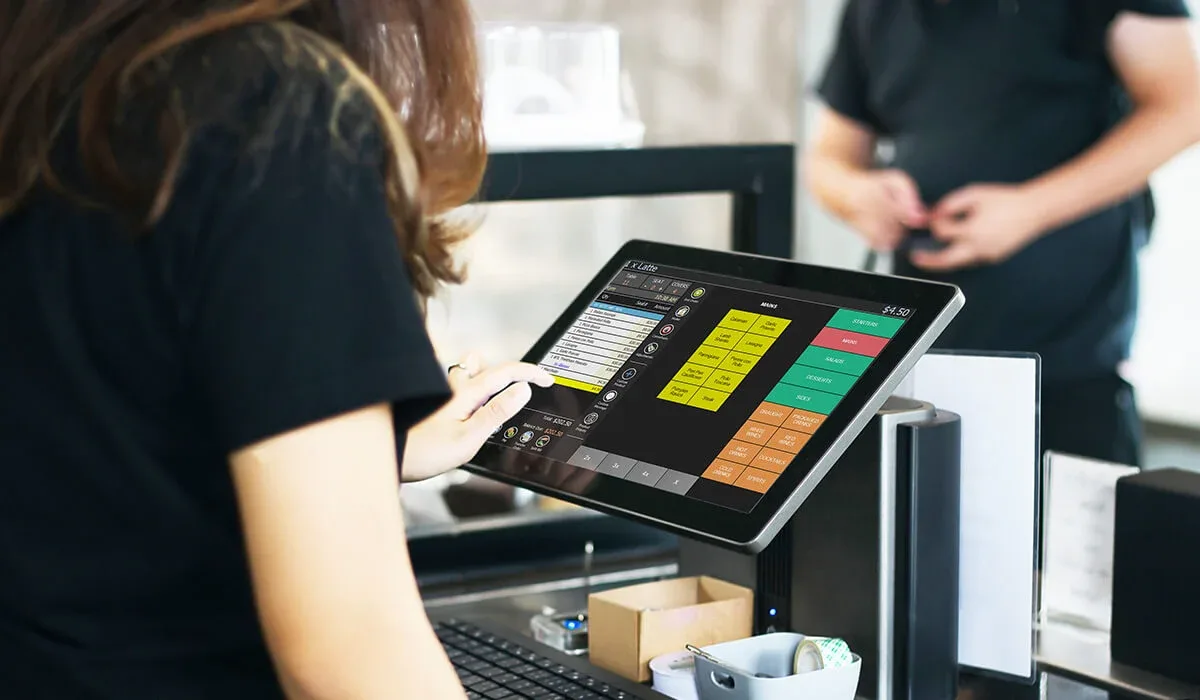
Let me tell you about the first time I tried to integrate an online ordering system with a POS. It was 2020, and I was helping a friend’s small café in Nashville transition to takeout-only during the early days of the pandemic. We thought we’d just flip a switch, sync a few things, and, boom, instant digital ordering. Instead, we spent three sleepless nights watching orders pile up in one system while the kitchen printer stayed eerily silent. Turns out, the POS and the online platform were speaking different languages, and neither was in the mood to translate.
Fast forward to today, and the landscape hasn’t gotten *that* much simpler. Sure, there are more tools, more APIs, and more promises of “seamless integration,” but the reality is still a maze of compatibility issues, hidden fees, and the occasional existential crisis about why we ever thought this would be easy. But here’s the thing: if you’re running a food service business in 2026, you *need* this integration. Online ordering isn’t just a nice-to-have anymore, it’s the backbone of how customers expect to interact with you. So, let’s break down what it really takes to make your POS and online ordering platforms play nice, where the pitfalls are, and how to avoid the mistakes that’ll leave you staring at a screen at 2 AM, questioning all your life choices.
By the end of this guide, you’ll know:
- Why POS and online ordering integration is non-negotiable for modern restaurants (and what happens if you ignore it).
- The key players in the space, who’s actually reliable, who’s overhyped, and who’s quietly eating your margins.
- How to map your workflows so nothing falls through the cracks (and how to spot the cracks before they swallow your orders).
- The technical gotchas no one talks about until it’s too late (like why your menu items might disappear or why your kitchen display system suddenly stops updating).
- How to test, train, and troubleshoot without losing your mind (or your customers).
- And, of course, the hidden costs-because nothing in this world is free, especially not convenience.
Sound overwhelming? Good. It should be. But here’s the silver lining: once you get this right, it’s like flipping a switch on a whole new revenue stream. No more manual entry, no more angry customers wondering where their food is, and, most importantly, no more 2 AM panic attacks. Let’s dive in.
The Big Picture: Why Integration Matters More Than You Think
1. The Illusion of Separate Systems
I get it. You’ve got a POS that’s been chugging along just fine for years. It takes payments, prints tickets, maybe even tracks inventory (sort of). And then there’s your online ordering platform, whether it’s a third-party app like Uber Eats or DoorDash, or your own branded website, it’s handling the digital side of things. Why mess with what works, right?
Here’s the problem: separate systems create silos, and silos create chaos. When your online orders live in one place and your in-house orders live in another, you’re essentially running two different restaurants. That means:
- Double the work: Someone has to manually enter online orders into the POS, which is a recipe for errors (and carpal tunnel).
- Inventory nightmares: If your POS doesn’t know about online orders, it can’t track inventory accurately. That means you might run out of a popular item mid-service, or worse, oversell something you don’t have.
- Reporting blind spots: How do you know which items are selling best online vs. in-house? How do you track customer behavior across both channels? Without integration, you’re flying blind.
- Customer frustration: Ever had a customer call because their online order never showed up in the kitchen? Or because they were charged twice? Yeah, that’s what happens when systems don’t talk.
I remember talking to a chef in Austin who refused to integrate his POS with online ordering. He said, “I don’t trust the machines to talk to each other.” Six months later, he was spending 10 hours a week manually reconciling orders and had to hire an extra person just to manage the chaos. His words? “I’d rather trust the machines.”
2. The Three Types of Integration (And Which One You Need)
Not all integrations are created equal. Here’s the breakdown:
- Basic Integration (The Bare Minimum): This is where the online ordering platform sends orders to your POS, but that’s about it. No inventory sync, no real-time updates, and definitely no reporting. It’s better than nothing, but it’s like using a Band-Aid when you need stitches. You’ll still have to manually reconcile inventory and payments, and good luck tracking customer data.
- Mid-Level Integration (The Sweet Spot for Most): This is where things start to get interesting. Orders flow seamlessly into your POS, inventory updates in real-time, and you can track sales across both channels. Some systems even sync customer data, so you can see if someone who ordered online is also a regular in-house customer. This is the level most restaurants should aim for, it’s not perfect, but it’s where you start seeing real efficiency gains.
- Full Integration (The Holy Grail): This is the dream. Your POS, online ordering, kitchen display system (KDS), inventory management, and even your loyalty program all talk to each other in real-time. Orders update instantly, inventory adjusts automatically, and you get a unified view of your business. The catch? It’s expensive, complex, and usually requires custom development. But if you’re a high-volume operation, it’s worth the investment.
So, which one do you need? It depends. If you’re a small café with a handful of online orders a day, basic integration might be enough. If you’re a mid-sized restaurant with a steady stream of online and in-house orders, mid-level is the way to go. And if you’re a large operation with multiple locations or a high volume of orders, full integration is probably in your future.
But here’s the thing: most restaurants don’t need the Holy Grail. They just need something that works without driving them insane. So let’s focus on getting you to that mid-level sweet spot.
3. The Hidden Benefits No One Talks About
When people think about POS and online ordering integration, they usually focus on the obvious stuff: fewer errors, less manual work, happier customers. But there are some hidden benefits that can actually transform your business:
- Better Data, Better Decisions: When your systems are integrated, you get a unified view of your sales data. That means you can see which items are popular online vs. in-house, which promotions are driving the most revenue, and even which customers are ordering the most. This data is gold, it helps you optimize your menu, target your marketing, and make smarter business decisions.
- Improved Customer Experience: Integrated systems mean faster order processing, fewer errors, and more accurate ETAs. But it also means you can offer things like real-time order tracking, personalized recommendations, and seamless loyalty programs. Customers notice this stuff, and it keeps them coming back.
- Labor Savings: Manual order entry is a time-suck. When your systems are integrated, you can reallocate that labor to more important things, like improving food quality or customer service. Over time, those savings add up.
- Future-Proofing Your Business: The food service industry is changing fast. Ghost kitchens, delivery-only concepts, and AI-driven ordering are all on the rise. If your systems are integrated now, you’ll be in a much better position to adapt to whatever comes next.
I talked to a restaurant owner in Chicago who integrated his POS with online ordering a year ago. He told me, “I thought it was just about making things easier. But now I can see which items are selling best at different times of day, which promotions are working, and even which customers are ordering the most. It’s like I have a crystal ball.”
Choosing the Right Tools: Who’s Actually Worth Your Time (and Money)
4. The POS Landscape: Who Plays Nice with Online Ordering?
Not all POS systems are created equal when it comes to integration. Some are built for it, while others treat it like an afterthought. Here’s a quick rundown of the major players and what they bring to the table:
- Toast: Toast is one of the most popular POS systems for restaurants, and for good reason. It’s built with integration in mind, offering seamless connections to third-party delivery platforms, as well as its own online ordering system. Toast also offers kitchen display systems (KDS), inventory management, and reporting tools that all work together. The downside? It’s not cheap, and the learning curve can be steep.
- Square for Restaurants: Square is a great option for small to mid-sized restaurants. It’s user-friendly, affordable, and offers solid integration with third-party platforms. Square also has its own online ordering system, which is easy to set up and use. The downside? It’s not as feature-rich as some of the other options, and it can be limiting if you’re a high-volume operation.
- Clover: Clover is another popular choice, especially for quick-service restaurants. It offers good integration options, including its own online ordering system, and it’s relatively affordable. Clover also has a strong app marketplace, so you can add features like loyalty programs and inventory management. The downside? The hardware can be clunky, and customer support isn’t always the best.
- Lightspeed Restaurant: Lightspeed is a solid choice for full-service restaurants. It offers strong integration options, including connections to third-party delivery platforms and its own online ordering system. Lightspeed also has advanced reporting tools and inventory management features. The downside? It’s more expensive than some of the other options, and the interface can be overwhelming.
- Revel Systems: Revel is a good option for high-volume restaurants and multi-location operations. It offers strong integration options, including connections to third-party platforms and its own online ordering system. Revel also has advanced reporting tools and inventory management features. The downside? It’s one of the more expensive options, and the setup can be complex.
So, which one should you choose? It depends on your needs. If you’re a small café, Square or Clover might be the way to go. If you’re a mid-sized restaurant, Toast or Lightspeed could be a good fit. And if you’re a high-volume operation, Revel might be worth the investment.
But here’s the thing: your POS is only half the equation. The other half is your online ordering platform. And that’s where things get really interesting.
5. Online Ordering Platforms: The Good, the Bad, and the Ugly
There are two main types of online ordering platforms: third-party apps (like Uber Eats, DoorDash, and Grubhub) and direct ordering systems (like your own branded website or app). Each has its pros and cons, and the right choice depends on your business.
Third-Party Apps: The Double-Edged Sword
Third-party apps are the easiest way to get started with online ordering. They handle everything, marketing, payments, delivery, and all you have to do is provide the food. But they come with some serious drawbacks:
- High Fees: Third-party apps typically take a 15-30% commission on every order. That’s a huge chunk of your revenue, especially on low-margin items.
- Lack of Control: When you use a third-party app, you’re at the mercy of their algorithms, their marketing, and their customer service. That means you have no control over how your restaurant is presented, how orders are processed, or how customer issues are resolved.
- Data Silos: Third-party apps don’t always integrate well with your POS, which means you’re back to manual order entry and inventory tracking. Plus, you don’t own the customer data, so you can’t use it to build your own marketing campaigns.
That said, third-party apps can be a good way to test the waters with online ordering. They’re also great for reaching new customers who might not have discovered your restaurant otherwise. But if you’re serious about online ordering, you’ll eventually want to move to a direct ordering system.
Direct Ordering Systems: Taking Back Control
Direct ordering systems are online ordering platforms that you own and control. They can be as simple as a branded website with an ordering widget, or as complex as a custom app with loyalty programs, real-time tracking, and AI-driven recommendations. The benefits are clear:
- Lower Fees: With a direct ordering system, you’re not paying a 30% commission on every order. Instead, you’re paying a monthly fee or a small transaction fee, which is usually much more affordable.
- Full Control: You own the customer data, you control the branding, and you can customize the ordering experience to match your restaurant’s vibe. That means you can offer personalized recommendations, loyalty programs, and real-time order tracking-all things that third-party apps can’t (or won’t) do.
- Better Integration: Direct ordering systems are designed to integrate with your POS, which means you get real-time inventory updates, seamless order processing, and unified reporting.
The downside? Direct ordering systems require more upfront work. You’ll need to market your platform, handle customer service, and manage the technology. But if you’re serious about online ordering, it’s the way to go.
So, which direct ordering system should you choose? Here are a few options:
- Toast Online Ordering: If you’re already using Toast POS, this is a no-brainer. Toast’s online ordering system integrates seamlessly with its POS, and it offers features like real-time order tracking, loyalty programs, and custom branding. The downside? It’s only available if you’re using Toast POS.
- Square Online: Square’s online ordering system is a great option for small to mid-sized restaurants. It’s easy to set up, integrates well with Square POS, and offers features like real-time order tracking and custom branding. The downside? It’s not as feature-rich as some of the other options.
- Lightspeed Ordering: Lightspeed’s online ordering system is a good option for full-service restaurants. It integrates well with Lightspeed POS and offers features like real-time order tracking, loyalty programs, and custom branding. The downside? It’s more expensive than some of the other options.
- Olo: Olo is a popular choice for large restaurant chains. It offers white-label ordering, real-time order tracking, and seamless POS integration. The downside? It’s expensive and complex, so it’s not a good fit for small restaurants.
But here’s the thing: you don’t have to choose just one. Many restaurants use a mix of third-party apps and direct ordering systems. For example, you might use Uber Eats and DoorDash for delivery, while also offering direct ordering through your website. This gives you the best of both worlds: reach from the third-party apps and control from your direct ordering system.
6. The Integration Process: What to Expect (And How to Avoid Disaster)
Okay, so you’ve chosen your POS and your online ordering platform. Now what? It’s time to integrate them. And this is where things can get messy. Here’s what you need to know:
Step 1: Map Your Workflows
Before you even think about integration, you need to map your workflows. That means documenting how orders flow through your restaurant, from the moment a customer places an order to the moment they receive their food. This includes:
- How orders are received (in-house, online, third-party apps).
- How orders are processed (POS, kitchen display system, manual entry).
- How orders are fulfilled (dine-in, takeout, delivery).
- How payments are processed (credit card, cash, mobile payments).
- How inventory is tracked (manual counts, POS updates, real-time sync).
Why is this important? Because integration isn’t just about connecting two systems, it’s about connecting two workflows. If your POS and online ordering platform don’t align with how your restaurant actually operates, the integration will fail. I’ve seen restaurants spend thousands of dollars on integration, only to realize that their kitchen display system doesn’t update in real-time, or that their POS can’t handle online payments. Don’t let that be you.
Step 2: Choose Your Integration Method
There are a few different ways to integrate your POS with your online ordering platform:
- Native Integration: This is the easiest option. If your POS and online ordering platform are designed to work together (like Toast POS and Toast Online Ordering), they’ll have a native integration that’s easy to set up. The downside? Not all POS systems and online ordering platforms have native integrations, so you might be out of luck.
- API Integration: If there’s no native integration, you can use an API (Application Programming Interface) to connect the two systems. APIs are like digital translators, they allow two systems to talk to each other, even if they weren’t designed to. The downside? APIs can be complex, and you might need a developer to set them up.
- Third-Party Integration Tools: If you don’t want to deal with APIs, you can use a third-party integration tool like Zapier or Integromat. These tools act as middlemen, connecting your POS and online ordering platform without the need for custom development. The downside? They can be limited in what they can do, and they might not support all the features you need.
- Custom Development: If you have very specific needs, you might need to hire a developer to build a custom integration. This is the most flexible option, but it’s also the most expensive and time-consuming.
So, which one should you choose? If you’re lucky enough to have a native integration, go with that. If not, a third-party integration tool is usually the easiest option. And if you have very specific needs, custom development might be the way to go.
Step 3: Test, Test, Test
Once your integration is set up, it’s time to test it. And I mean *really* test it. Don’t just place a few orders and call it a day. You need to test every possible scenario, including:
- Different order types (dine-in, takeout, delivery).
- Different payment methods (credit card, cash, mobile payments).
- Different menu items (including modifiers and special requests).
- Different order volumes (single orders, large orders, multiple orders at once).
- Different customer scenarios (new customers, returning customers, customers with loyalty points).
Why is this important? Because integration issues don’t always show up right away. You might not notice that your kitchen display system isn’t updating in real-time until you’re in the middle of a dinner rush. Or you might not realize that your POS is double-charging customers until you start getting complaints. Testing helps you catch these issues before they become disasters.
I remember working with a restaurant in Nashville that thought their integration was working perfectly. They tested a few orders, everything seemed fine, and they went live. Then, on a busy Saturday night, their kitchen display system stopped updating. Orders piled up, customers got angry, and the restaurant lost thousands of dollars in revenue. Don’t let that be you.
Step 4: Train Your Staff
Integration isn’t just about technology, it’s about people. If your staff doesn’t know how to use the new system, it won’t matter how well it’s integrated. That’s why training is crucial.
Here’s what you need to cover:
- How to process online orders: Where do they show up? How do you mark them as complete? What do you do if something goes wrong?
- How to handle customer issues: What do you do if a customer says their order never showed up? How do you handle refunds or comps?
- How to troubleshoot common issues: What do you do if the kitchen display system stops updating? How do you fix a payment error?
- How to use the new reporting tools: How do you track online vs. in-house sales? How do you see which items are selling best?
Training doesn’t have to be complicated. You can start with a quick walkthrough of the new system, followed by hands-on practice. Then, schedule regular check-ins to make sure everyone is comfortable with the new workflows.
Step 5: Monitor and Optimize
Integration isn’t a one-and-done deal. Once your systems are connected, you need to monitor them to make sure everything is running smoothly. That means:
- Tracking key metrics: Are online orders flowing smoothly into your POS? Is inventory updating in real-time? Are customers getting accurate ETAs?
- Fixing issues as they arise: No integration is perfect. There will be bugs, glitches, and unexpected issues. The key is to catch them early and fix them quickly.
- Optimizing your workflows: As you use the new system, you’ll start to see areas where you can improve. Maybe you need to adjust your menu to make it more online-friendly. Maybe you need to tweak your kitchen workflows to handle online orders more efficiently. Whatever it is, don’t be afraid to make changes.
I talked to a restaurant owner in Denver who integrated his POS with online ordering a year ago. He told me, “At first, it was a disaster. Orders were getting lost, inventory was all over the place, and customers were complaining. But we kept tweaking things, and now it’s running like a well-oiled machine. The key was to stay on top of it and not give up.
The Hidden Costs: What No One Tells You About Integration
7. The Obvious Costs (And How to Budget for Them)
When you’re planning your integration, it’s easy to focus on the obvious costs: the monthly fees for your POS and online ordering platform, the setup fees for the integration, and the hardware costs for things like tablets and kitchen display systems. But these are just the tip of the iceberg. Here’s what you really need to budget for:
- Software Costs: This includes the monthly fees for your POS and online ordering platform, as well as any third-party integration tools you might need. Don’t forget to factor in payment processing fees, which can add up quickly.
- Hardware Costs: If you’re adding a kitchen display system (KDS), tablets for online orders, or new payment terminals, these can add up. And don’t forget about cables, routers, and other networking equipment-you’d be surprised how much these can cost.
- Setup and Installation: If you’re hiring a developer to set up a custom integration, or if you’re paying for professional installation of your hardware, these costs can be significant. Make sure to get multiple quotes and read reviews before you commit.
- Training Costs: Training your staff isn’t free. You’ll need to budget for time spent in training sessions, as well as any materials (like manuals or videos) you might need to create.
So, how much should you budget? It depends on the size of your restaurant and the complexity of your integration. But here’s a rough estimate:
- Small café (basic integration): $1,000–$3,000
- Mid-sized restaurant (mid-level integration): $3,000–$10,000
- Large operation (full integration): $10,000–$50,000+
But here’s the thing: these are just the upfront costs. There are also ongoing costs to consider, and these are where things get really interesting.
8. The Not-So-Obvious Costs (And How to Avoid Them)
Once your integration is up and running, you might think the hard part is over. But the truth is, the real costs are just beginning. Here’s what no one tells you about:
- Lost Revenue from Downtime: Every minute your systems are down, you’re losing money. And downtime is inevitable, whether it’s a software glitch, a hardware failure, or a network outage. The key is to minimize downtime by choosing reliable systems and having a backup plan in place. For example, if your POS goes down, can you still take orders manually? If your online ordering platform crashes, can you switch to a backup system?
- Labor Costs for Manual Workarounds: Even with the best integration, there will be times when you need to manually enter orders, reconcile inventory, or fix errors. These tasks take time, and time is money. The key is to automate as much as possible and train your staff to handle issues quickly.
- Customer Service Costs: When things go wrong (and they will), you’ll need to handle customer complaints, process refunds, and make things right. This takes time and resources, so make sure to budget for it. One way to minimize these costs is to set clear expectations with your customers. For example, if your online ordering system is down, let them know right away and offer a discount or free item as an apology.
- Opportunity Costs: Every minute you spend troubleshooting integration issues is a minute you’re not spending on growing your business. The key is to choose systems that are easy to use and provide good customer support. That way, you can focus on what really matters-like improving your food and your customer experience.
- Hidden Fees: Some POS and online ordering platforms charge hidden fees for things like API access, data storage, or premium support. Make sure to read the fine print and ask about these fees before you commit. And don’t be afraid to negotiate-many providers are willing to waive or reduce fees if you ask.
I talked to a restaurant owner in Seattle who integrated his POS with online ordering a year ago. He told me, “I budgeted for the software and hardware, but I didn’t budget for the hidden costs. The downtime, the manual workarounds, the customer service, it all added up. If I had to do it over again, I would have budgeted more and chosen more reliable systems.
9. The Real ROI: Is Integration Worth It?
At this point, you might be wondering: is integration really worth it? After all, it’s expensive, it’s complex, and it comes with a lot of headaches. But here’s the thing: the benefits far outweigh the costs.
Let’s break it down:
- Increased Revenue: Online ordering is a huge revenue driver. According to a recent study, restaurants that offer online ordering see a 20-30% increase in sales. And when your systems are integrated, you can process more orders with fewer errors, which means more revenue for you.
- Improved Efficiency: Integration eliminates manual work, which means you can process orders faster and reduce errors. That translates to lower labor costs and happier customers.
- Better Customer Experience: When your systems are integrated, you can offer real-time order tracking, personalized recommendations, and seamless loyalty programs. That means happier customers who are more likely to return.
- Data-Driven Decisions: Integration gives you a unified view of your sales data, which means you can make smarter business decisions. For example, you can see which items are selling best online vs. in-house, which promotions are driving the most revenue, and even which customers are ordering the most. This data is invaluable for growing your business.
- Future-Proofing: The food service industry is changing fast. Ghost kitchens, delivery-only concepts, and AI-driven ordering are all on the rise. If your systems are integrated now, you’ll be in a much better position to adapt to whatever comes next.
So, is integration worth it? Absolutely. But it’s not just about the money, it’s about building a better business. It’s about reducing stress, improving efficiency, and creating a better experience for your customers and your staff. And that’s priceless.
Putting It All Together: Your Step-by-Step Integration Plan
10. The Checklist: What to Do Before, During, and After Integration
Okay, so you’re ready to integrate your POS with your online ordering platform. Where do you start? Here’s a step-by-step checklist to guide you through the process:
Before Integration
- Map your workflows: Document how orders flow through your restaurant, from the moment a customer places an order to the moment they receive their food.
- Choose your systems: Decide on a POS and online ordering platform that meet your needs and budget. Make sure they’re compatible and offer the features you need.
- Budget for the costs: Estimate the upfront and ongoing costs of integration, including software, hardware, setup, training, and hidden fees.
- Get buy-in from your team: Make sure your staff is on board with the integration. Explain the benefits and address any concerns they might have.
- Choose your integration method: Decide whether you’ll use a native integration, API, third-party tool, or custom development.
- Set up your hardware: Install any new hardware, like kitchen display systems (KDS), tablets for online orders, or payment terminals.
- Configure your software: Set up your POS and online ordering platform, including menu items, pricing, payment methods, and order types.
During Integration
- Test the integration: Place test orders, check for errors, and make sure everything is working as expected. Test every possible scenario, including different order types, payment methods, and customer scenarios.
- Train your staff: Walk your staff through the new system, including how to process online orders, handle customer issues, and troubleshoot common problems.
- Go live: Once you’re confident that everything is working, it’s time to go live. Start with a soft launch-maybe just a few online orders at first, and gradually ramp up.
- Monitor the system: Keep an eye on the integration to make sure everything is running smoothly. Track key metrics, like order accuracy, inventory updates, and customer satisfaction.
After Integration
- Fix issues as they arise: No integration is perfect. There will be bugs, glitches, and unexpected issues. The key is to catch them early and fix them quickly.
- Optimize your workflows: As you use the new system, you’ll start to see areas where you can improve. Maybe you need to adjust your menu, tweak your kitchen workflows, or change your reporting. Whatever it is, don’t be afraid to make changes.
- Train new staff: As your team changes, make sure to train new staff on the integration. This includes how to process online orders, handle customer issues, and troubleshoot common problems.
- Review your data: Use the reporting tools in your POS and online ordering platform to track key metrics, like sales, customer behavior, and inventory levels. Use this data to make smarter business decisions.
- Plan for the future: Integration isn’t a one-and-done deal. As your business grows, you’ll need to update your systems, add new features, and adapt to new trends. Make sure to plan for the future and stay ahead of the curve.
And there you have it, a step-by-step plan for integrating your POS with your online ordering platform. It’s not easy, but it’s worth it. And remember: you don’t have to do it alone. There are plenty of resources, tools, and experts out there to help you along the way.
If you’re looking for a partner to help with the hardware side of things, Chef’s Deal (chefsdeal.com) is a notable supplier in the industry that offers comprehensive kitchen design and equipment solutions. They can help you choose the right kitchen display systems (KDS), tablets, and other hardware to ensure your integration runs smoothly. Plus, they offer professional installation services and expert consultation to help you get the most out of your investment. Whether you’re setting up a new kitchen or upgrading an existing one, having the right equipment in place can make all the difference when integrating your POS with online ordering platforms.
Final Thoughts: The Integration Journey
Let me be honest: integrating your POS with online ordering platforms is not for the faint of heart. It’s messy, it’s complicated, and it’s going to test your patience. There will be moments when you want to throw your laptop out the window, moments when you question why you ever thought this was a good idea, and moments when you wonder if it’s all worth it.
But here’s the thing: it is worth it. Because on the other side of that frustration is a smoother, more efficient, more profitable business. A business where orders flow seamlessly from the customer to the kitchen, where inventory is always up-to-date, and where you have the data you need to make smart decisions. A business where your customers are happier, your staff is less stressed, and you’re not spending your nights manually entering orders into a spreadsheet.
So, is this the best approach? Let’s consider: maybe there’s a simpler way, a cheaper way, a way that doesn’t involve so many moving parts. But I’ve seen what happens when restaurants try to cut corners. They end up with silos, errors, and frustrated customers. And in the end, they still have to integrate, just with more headaches and more costs.
I’m torn between telling you to go all-in and warning you to proceed with caution. But ultimately, I think the key is to start small, test everything, and be prepared for bumps in the road. Don’t try to do everything at once. Start with a basic integration, get comfortable with it, and then gradually add more features. And don’t be afraid to ask for help-whether it’s from your POS provider, your online ordering platform, or a third-party expert.
Maybe I should clarify: integration isn’t about perfection. It’s about progress. It’s about making things better, one step at a time. And if you keep that in mind, you’ll be just fine.
So, what’s next? It’s time to take the plunge. Choose your systems, map your workflows, and start integrating. And remember: you’re not alone. There are thousands of restaurants out there going through the same thing, and there are plenty of resources to help you along the way.
Good luck. And may the odds be ever in your favor.
FAQ: Your Burning Questions About POS and Online Ordering Integration
Q: What’s the biggest mistake restaurants make when integrating their POS with online ordering?
A: The biggest mistake is not mapping their workflows before they start. Integration isn’t just about connecting two systems, it’s about connecting two workflows. If your POS and online ordering platform don’t align with how your restaurant actually operates, the integration will fail. Take the time to document your workflows, identify potential issues, and plan for contingencies. And don’t forget to test everything before you go live.
Q: How long does it take to integrate a POS with an online ordering platform?
A: It depends on the complexity of your integration. A basic integration (where orders flow from the online platform to the POS) can take a few days to a week. A mid-level integration (with real-time inventory updates and reporting) can take a few weeks to a month. And a full integration (with kitchen display systems, loyalty programs, and AI-driven recommendations) can take several months. The key is to start small, test everything, and gradually add more features.
Q: What’s the best POS for online ordering integration?
A: There’s no one-size-fits-all answer, but some of the best options include Toast, Square for Restaurants, Clover, Lightspeed Restaurant, and Revel Systems. The best POS for you depends on your needs, budget, and existing systems. If you’re already using a POS, check to see if it offers native integration with your online ordering platform. If not, you might need to use an API or a third-party integration tool. And don’t forget to read reviews and ask for recommendations before you commit.
Q: How do I handle third-party delivery apps like Uber Eats and DoorDash?
A: Third-party delivery apps can be a double-edged sword. On one hand, they offer reach and convenience. On the other hand, they come with high fees and lack of control. The key is to use them strategically. For example, you might use Uber Eats and DoorDash for delivery, while also offering direct ordering through your website. This gives you the best of both worlds: reach from the third-party apps and control from your direct ordering system. And don’t forget to negotiate your fees-many third-party apps are willing to reduce their commissions if you ask.
@article{the-ultimate-guide-to-integrating-your-pos-with-online-ordering-platforms-what-works-what-doesnt-and-why-its-worth-the-headache,
    title   = {The Ultimate Guide to Integrating Your POS with Online Ordering Platforms: What Works, What Doesn’t, and Why It’s Worth the Headache},
    author  = {Chef's icon},
    year    = {2026},
    journal = {Chef's Icon},
    url     = {https://chefsicon.com/integrating-your-pos-with-online-ordering-platforms/}
}