The Best Fluffy Pancakes recipe you will fall in love with. Full of tips and tricks to help you make the best pancakes.
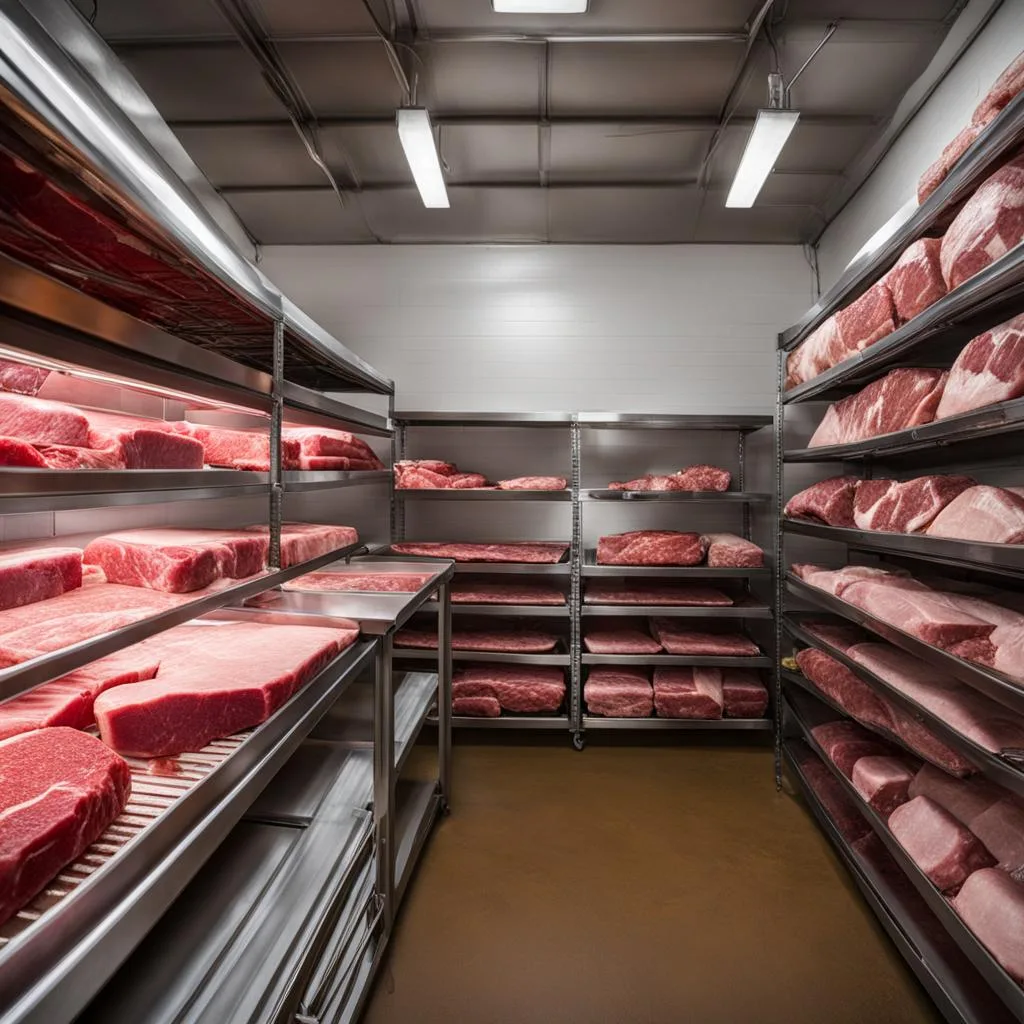
Let me tell you about the time I walked into a restaurant’s walk-in freezer and nearly had a panic attack. It was like stepping into a frozen meat labyrinth, pork shoulders stacked haphazardly next to bags of chicken thighs, beef short ribs buried under boxes of ground turkey, and a lone, sad-looking salmon fillet that had clearly been forgotten since 2024. The chef, a friend of mine, just shrugged and said, “Yeah, we just kind of… throw it in there.” Needless to say, their inventory system was about as organized as my sock drawer after laundry day.
If you’re reading this, you probably already know that organizing bulk frozen meat isn’t just about avoiding a freezer-induced existential crisis, it’s about saving time, reducing waste, and keeping your kitchen running smoother than a well-oiled grill. But here’s the thing: there’s no one-size-fits-all solution. What works for a high-volume steakhouse might not cut it for a cozy bistro, and what’s efficient for a food truck could be a disaster in a hotel kitchen. So, let’s break this down. By the end of this article, you’ll have a system that works for your kitchen, not just some idealized version of what a “perfect” inventory should look like.
We’ll cover everything from the best storage containers (spoiler: not all plastic is created equal) to labeling systems that actually make sense, plus a few hard-earned lessons from chefs who’ve learned the hard way. And if you’re wondering whether you need to invest in fancy equipment or if your current setup is holding you back, don’t worry, we’ll tackle that too. Ready? Let’s dive in.
The Psychology of Frozen Meat Chaos (And Why It’s Worse Than You Think)
Before we get into the nitty-gritty of shelving and labels, let’s talk about why frozen meat inventory is such a nightmare in the first place. It’s not just about the cold, it’s about the way our brains (and our staff’s brains) process information in high-pressure environments. Think about it: when you’re in the middle of a dinner rush, the last thing you want to do is dig through a mountain of frozen protein to find that one bag of shrimp. But here’s the kicker: the more disorganized your freezer is, the more time you waste, and the more likely you are to make mistakes. And mistakes in a restaurant? They’re expensive.
I once worked with a chef who swore by the “first in, first out” (FIFO) method but had no actual system to enforce it. His freezer was a graveyard of forgotten proteins, with some items dating back to the Obama administration. When I asked him why he didn’t just reorganize, he said, “It’s not that simple. If I move everything around, my staff won’t know where anything is.” And that’s the problem, isn’t it? We get so used to the chaos that we convince ourselves it’s the only way. But here’s the truth: a disorganized freezer isn’t just inefficient, it’s a silent profit killer.
So, how do we fix it? First, we need to accept that change is going to feel weird at first. Your staff might resist. You might even resist. But if you can push through that initial discomfort, you’ll end up with a system that saves you time, money, and a whole lot of headaches. And trust me, your future self will thank you.
Step 1: Assess Your Current Setup (And Be Honest With Yourself)
Before you buy a single storage bin or label, take a hard look at your current freezer situation. Grab a notebook (or your phone, if you’re not a pen-and-paper person) and answer these questions:
- How much frozen meat do you typically have on hand at any given time?
- What’s the most common type of meat you store? (Beef, chicken, pork, seafood, etc.)
- Do you have dedicated shelving, or is everything stacked on the floor?
- How often do you lose track of inventory or find expired items?
- What’s the biggest pain point in your current system? (E.g., “It takes forever to find what I need,” “We waste too much meat,” “My staff never puts things back where they belong.”)
Be brutally honest here. If your freezer looks like a scene from Hoarders: Frozen Edition, own it. The goal isn’t to shame yourself, it’s to identify the specific problems you need to solve. For example, if you’re constantly losing track of ground beef, maybe you need a better labeling system. If your staff can’t find the chicken thighs when they need them, maybe your shelving is the issue. The first step to fixing a problem is admitting you have one.
And while you’re at it, take some photos of your freezer. Not for Instagram, just for reference. Sometimes, seeing the chaos from a different angle can help you spot patterns or problems you didn’t notice before. Plus, it’ll be satisfying to look back at those photos once you’ve got your system dialed in.
Step 2: Choose the Right Storage Containers (Because Not All Plastic Is Equal)
Here’s where things get a little controversial. Not all storage containers are created equal, and if you’re using the wrong ones, you’re basically sabotaging your own efforts. I’ve seen restaurants use everything from flimsy plastic bags to repurposed cardboard boxes, and let me tell you: neither of those is a good idea. Cardboard? That’s a one-way ticket to freezer burn city. Flimsy plastic? It’ll crack, tear, or worse, leak.
So, what should you use? Here are your best options:
- Vacuum-sealed bags: These are the gold standard for long-term storage. They remove all the air, which prevents freezer burn and keeps meat fresher for longer. The downside? They can be expensive, and you’ll need a vacuum sealer. But if you’re storing bulk meat, it’s worth the investment. Pro tip: Label the bags before you seal them, or you’ll end up with a freezer full of mystery meat.
- Heavy-duty plastic bins: These are great for organizing smaller items or grouping like items together. Look for bins that are food-grade, BPA-free, and freezer-safe. Avoid anything with a flimsy lid, you want something that’s going to hold up to daily use. I’ve had good luck with brands like Rubbermaid and Cambro, but there are plenty of options out there.
- Stackable sheet pans: If you’re storing larger cuts of meat, stackable sheet pans can be a game-changer. They’re easy to label, easy to access, and they maximize vertical space. Just make sure they’re NSF-certified (more on that later).
- Reusable silicone bags: These are a more eco-friendly alternative to vacuum-sealed bags. They’re durable, reusable, and they take up less space than plastic bins. The downside? They’re not as airtight as vacuum-sealed bags, so they’re better for shorter-term storage.
Now, here’s where things get tricky. If you’re running a high-volume kitchen, you might need a mix of these options. For example, you could use vacuum-sealed bags for long-term storage and plastic bins for items you use more frequently. The key is to choose containers that fit your workflow and your budget. And if you’re not sure what will work best, don’t be afraid to experiment. Try a few different options and see what feels right.
Oh, and one more thing: avoid glass. I know, I know, it’s eco-friendly and easy to clean. But glass and freezers? They don’t mix. One slip, and you’ve got a freezer full of shattered glass and ruined meat. Trust me, it’s not worth the risk.
Where to Buy Storage Containers (Without Breaking the Bank)
If you’re looking for a one-stop shop for commercial-grade storage solutions, Chef’s Deal is a solid option. They offer a wide range of food-safe, freezer-proof containers, from heavy-duty plastic bins to stackable sheet pans. Plus, they’ve got free kitchen design services if you’re looking to overhaul your entire storage system. I’ve worked with them before, and their team is great at helping you find the right products for your specific needs. Just don’t expect them to solve all your problems, you’ll still need to put in the work to organize everything.
That said, don’t feel like you have to buy everything new. If you’ve got sturdy, food-safe containers lying around, use them! The goal is to make your life easier, not to spend a fortune on fancy equipment. But if you’re starting from scratch, it’s worth investing in quality containers that will last.
Step 3: Label Everything (And I Mean Everything)
If there’s one thing I’ve learned from working in restaurants, it’s this: if it’s not labeled, it doesn’t exist. Seriously. You could have the most organized freezer in the world, but if your staff can’t tell what’s what, it’s all for nothing. And let’s be real, no one has time to play “guess the frozen meat” during a busy service.
So, how do you label effectively? Here’s what you need to include on every single item:
- Name of the item: Be specific. “Chicken” isn’t enough, is it chicken thighs, breasts, or wings? “Beef” isn’t helpful, is it ground beef, short ribs, or brisket?
- Date of freezing: This is crucial for FIFO (first in, first out) inventory management. Use a permanent marker or a label maker to write the date clearly. Pro tip: Use the month/day/year format (e.g., 03/25/26) to avoid confusion.
- Use-by date: This is different from the freezing date. Most meats can be stored in the freezer for 6-12 months, but it’s good to have a reminder of when they should be used by. Check the USDA guidelines for specific recommendations.
- Quantity: If you’re storing multiple items in one container, note how many are inside. For example, “10 lbs ground beef” or “20 chicken thighs.”
- Supplier info (optional): If you’re working with multiple suppliers, it can be helpful to note where the meat came from. This is especially useful if you ever need to track down a specific batch.
Now, here’s the thing: labeling only works if everyone actually uses the labels. That means training your staff on how to read and update them. For example, if someone takes half a bag of shrimp, they should update the quantity on the label. If they move something to a different shelf, they should make sure the label is still visible. It’s a team effort, and it won’t work if only one person is on board.
Labeling Tools That Actually Work
Not all labeling tools are created equal. Here’s what I recommend:
- Permanent markers: These are cheap, easy to use, and they work on pretty much any surface. The downside? They can smudge or fade over time. If you’re using them, make sure to re-label items every few months.
- Label makers: These are great for creating clear, professional-looking labels. They’re especially useful if you’re labeling bins or shelves. The downside? They can be a pain to use if you’re labeling a lot of small items.
- Freezer tape: This is a game-changer. Freezer tape is designed to stick to cold surfaces, so it won’t peel off like regular tape. It’s perfect for labeling bags or containers that are going straight into the freezer.
- Chalkboard labels: If you’re using plastic bins, chalkboard labels can be a fun and functional option. They’re easy to update, and they give your freezer a more polished look. The downside? They’re not as durable as other options.
Personally, I’m a fan of a combination of freezer tape and a label maker. The tape is great for individual items, and the label maker is perfect for bins and shelves. But honestly, the best labeling tool is the one you’ll actually use. If you hate label makers, don’t buy one. If you love the look of chalkboard labels, go for it. The key is consistency, whatever you choose, stick with it.
Step 4: Implement a Shelving System That Actually Makes Sense
Shelving is the backbone of your frozen meat organization. Get it wrong, and you’ll spend half your time digging through piles of meat. Get it right, and you’ll be able to find what you need in seconds. But here’s the thing: there’s no one “right” way to shelve your freezer. It all depends on your kitchen’s needs, your storage space, and your workflow.
That said, there are a few general principles to keep in mind:
- Group like items together: This might seem obvious, but you’d be surprised how many restaurants don’t do it. Keep all your beef in one section, all your chicken in another, and so on. This makes it easier to find what you need and reduces the risk of cross-contamination.
- Use vertical space: Freezers are tall for a reason. If you’re not using the vertical space, you’re wasting valuable real estate. Invest in shelving units that allow you to stack items safely and efficiently.
- Keep frequently used items within easy reach: If you’re constantly grabbing chicken thighs, don’t bury them at the back of the freezer. Keep them at eye level or on the top shelf where they’re easy to access.
- Avoid overcrowding: It’s tempting to cram as much as possible into your freezer, but overcrowding makes it harder to find what you need and increases the risk of freezer burn. Leave some breathing room so air can circulate.
Now, let’s talk about the different types of shelving systems you can use:
1. Wire Shelving
Wire shelving is a classic for a reason. It’s durable, easy to clean, and it allows air to circulate, which helps prevent freezer burn. The downside? It’s not great for small items, and it can be a pain to label. If you’re using wire shelving, I recommend pairing it with plastic bins to keep things organized.
2. Solid Shelving
Solid shelving is great for storing larger items or items that might fall through wire shelving. It’s also easier to label, since you can write directly on the shelf. The downside? It doesn’t allow for as much air circulation, so you’ll need to be mindful of freezer burn.
3. Mobile Shelving
If you’re tight on space, mobile shelving can be a game-changer. These units are on wheels, so you can move them around as needed. They’re great for small kitchens or for storing items that you don’t use every day. The downside? They can be expensive, and they’re not always the most stable option.
4. Custom Shelving
If you’ve got the budget, custom shelving is the way to go. You can design a system that fits your exact needs, whether that’s extra-deep shelves for large cuts of meat or adjustable shelves for items of different sizes. The downside? It’s a big investment, and it’s not always necessary. If you’re not sure whether custom shelving is right for you, consider working with a company like Chef’s Deal. They offer free kitchen design services, so you can get a sense of what’s possible before you commit.
At the end of the day, the best shelving system is the one that works for you. Don’t be afraid to experiment with different setups until you find something that feels right. And if you’re not sure where to start, take a look at how other restaurants in your niche are doing it. You might be surprised by what you learn.
Step 5: Master the Art of FIFO (First In, First Out)
FIFO isn’t just a buzzword, it’s the backbone of efficient inventory management. The idea is simple: the first items you put into your freezer should be the first items you use. This ensures that nothing gets forgotten or expires, and it helps you rotate your stock efficiently. But here’s the thing: FIFO is easier said than done. In the heat of the moment, it’s all too easy to grab the first thing you see, even if it’s not the oldest item.
So, how do you make FIFO work in the real world? Here are a few strategies:
- Label everything with the date: I know I already mentioned this, but it’s worth repeating. If you don’t know when something was frozen, you can’t practice FIFO. Make sure every item has a clear, visible date.
- Organize your shelves by date: Arrange your freezer so that the oldest items are at the front and the newest items are at the back. This makes it easy to grab the oldest item first. If you’re using bins, you can even label them with the date range (e.g., “March 1-15”).
- Train your staff: FIFO only works if everyone is on board. Make sure your staff understands the importance of using the oldest items first, and hold them accountable. If you notice someone grabbing a newer item when an older one is available, call them out (politely, of course).
- Conduct regular inventory checks: Even with the best intentions, things can get overlooked. Set aside time every week to go through your freezer and make sure everything is being used in the right order. If you find something that’s been sitting around for too long, make a plan to use it ASAP.
Now, I’ll be honest: FIFO can be a pain. It requires discipline, and it’s not always the most convenient option. But here’s the thing: the alternative is worse. If you don’t practice FIFO, you’ll end up with a freezer full of forgotten meat, and that’s a waste of money and resources. So, suck it up and make it a priority. Your bottom line will thank you.
Step 6: Use Technology to Your Advantage (But Don’t Overcomplicate Things)
Let’s talk about technology. There’s no shortage of apps, software, and gadgets designed to help you manage your restaurant inventory. Some of them are amazing. Some of them are overkill. And some of them are just plain confusing. So, how do you know what’s worth your time (and money)?
First, let’s talk about the basics. If you’re not already using some form of digital inventory management, you’re missing out. Even a simple spreadsheet can make a huge difference. Here’s what you should be tracking:
- Item name: Be as specific as possible.
- Quantity: How much do you have on hand?
- Date frozen: When did you put it in the freezer?
- Use-by date: When should it be used by?
- Supplier info: Where did it come from?
- Location: Where is it stored in the freezer?
You can track all of this in a spreadsheet, or you can use a dedicated inventory management app. Some popular options include:
- Toast: This is a full-featured restaurant management system, but it includes inventory tracking features. It’s great if you’re already using Toast for other aspects of your business.
- Upserve: Another all-in-one system with inventory management capabilities. It’s user-friendly and integrates with a lot of other tools.
- MarketMan: This is a dedicated inventory management app. It’s great for tracking usage, managing orders, and staying on top of your stock.
- SimpleOrder: This is a more affordable option that’s great for small restaurants. It’s not as feature-rich as some of the other options, but it gets the job done.
Now, here’s where things get tricky. If you’re running a small kitchen, a spreadsheet might be all you need. But if you’re managing a larger operation, you might want to invest in a more robust system. The key is to find something that works for you. Don’t get sucked into the hype of the latest and greatest app if it’s not going to make your life easier.
And one more thing: don’t rely on technology alone. No app or software can replace good old-fashioned organization and discipline. Use technology as a tool, not a crutch. If you’re not labeling your items or practicing FIFO, no amount of software is going to save you.
Step 7: Train Your Staff (Because Your System Is Only as Good as Your Weakest Link)
You could have the most organized freezer in the world, but if your staff doesn’t know how to use it, it’s all for nothing. Training is the key to making your new system stick. But here’s the thing: training isn’t a one-and-done deal. It’s an ongoing process, and it requires patience, repetition, and a willingness to adapt.
So, how do you train your staff effectively? Here are a few tips:
- Start with the why: Before you dive into the how, explain why organization matters. Talk about the cost of wasted meat, the time saved by an efficient system, and the importance of food safety. If your staff understands the bigger picture, they’ll be more likely to buy in.
- Make it hands-on: Don’t just talk at your staff, get them involved. Have them help you reorganize the freezer, label items, and practice FIFO. The more they do it themselves, the more likely they are to remember.
- Create a cheat sheet: Put together a simple guide that outlines your new system. Include photos, diagrams, and step-by-step instructions. Post it in the freezer and refer to it during training.
- Assign a point person: Designate someone on your team to be the go-to person for freezer questions. This could be you, or it could be a trusted staff member. The point is to have someone who can answer questions and keep everyone on track.
- Hold regular check-ins: Don’t assume that your staff will remember everything after one training session. Schedule regular check-ins to go over the system, answer questions, and address any issues.
Now, I’ll be honest: training can be frustrating. You might feel like you’re repeating yourself over and over, and you might even wonder if it’s worth the effort. But here’s the thing: a well-trained staff is the difference between a system that works and one that falls apart. So, stick with it. And if you’re not seeing the results you want, don’t be afraid to switch things up. Maybe your training methods need tweaking, or maybe you need to adjust your system to better fit your staff’s needs.
Step 8: Conduct Regular Inventory Audits (Because Things Slip Through the Cracks)
Even with the best system in the world, things can go wrong. Meat gets misplaced. Labels fade. Staff forgets to update the inventory. That’s why regular audits are so important. An audit is essentially a reality check, it’s a chance to make sure your system is working the way it should and to catch any issues before they become big problems.
So, how often should you conduct an audit? It depends on your kitchen. If you’re a high-volume restaurant with a lot of turnover, you might want to do a quick audit every week. If you’re a smaller operation, you might be able to get away with a monthly audit. The key is to find a schedule that works for you and stick to it.
Here’s what you should be looking for during an audit:
- Accuracy: Does your physical inventory match your records? If not, where are the discrepancies?
- Expiration dates: Are there any items that are past their use-by date? If so, make a plan to use them ASAP or dispose of them.
- Labeling: Are all items properly labeled? Are the labels still legible?
- Organization: Is everything in its proper place? Are there any items that are misplaced or hard to find?
- Freezer burn: Are there any items that show signs of freezer burn? If so, consider whether your storage containers or shelving need an upgrade.
Now, here’s where things get a little tricky. Audits can be time-consuming, and it’s easy to put them off when you’re busy. But here’s the thing: the longer you wait, the bigger the problems become. A small discrepancy today could turn into a major issue next week. So, make audits a priority. Set aside time on your calendar, and treat it like any other important task.
And one more thing: don’t be afraid to involve your staff in the audit process. They’re the ones who use the freezer every day, so they’re more likely to notice issues that you might miss. Plus, involving them in the audit can help reinforce the importance of organization and accountability.
Step 9: Adjust and Adapt (Because No System Is Perfect)
Here’s the thing about systems: they’re not set in stone. What works today might not work tomorrow, and what works for one restaurant might not work for another. That’s why it’s so important to be flexible. Don’t be afraid to tweak your system as needed, and don’t be afraid to admit when something isn’t working.
For example, let’s say you implement a new shelving system, but you notice that your staff is still struggling to find what they need. Maybe the shelves are too deep, or maybe the labels aren’t visible enough. Instead of throwing your hands up in frustration, take a step back and ask yourself: what’s the root of the problem? Is it the shelving, the labeling, or something else entirely? Once you identify the issue, you can make the necessary adjustments.
Or let’s say you start using a new inventory management app, but you find that it’s more trouble than it’s worth. Maybe it’s too complicated, or maybe it doesn’t integrate with your other systems. Instead of forcing yourself to use it, ask yourself: is there a simpler solution? Maybe a spreadsheet would work better, or maybe you just need to tweak your workflow.
The point is, your system should work for you, not the other way around. If something isn’t working, don’t be afraid to change it. And if you’re not sure what to change, don’t be afraid to ask for help. Talk to your staff, talk to other chefs, or even reach out to a company like Chef’s Deal for advice. They’ve got expert consultation and support services that can help you troubleshoot your system and find the right solutions for your kitchen.
Step 10: Celebrate Your Success (Because You’ve Earned It)
Let’s be real: organizing your bulk frozen meat inventory is a big deal. It’s not the most glamorous task, but it’s one of those things that can make a huge difference in your day-to-day operations. So, when you finally get your system dialed in, take a moment to celebrate. You’ve earned it.
What does celebrating look like? It could be as simple as taking a deep breath and admiring your newly organized freezer. It could be treating yourself to a nice dinner (made with meat from your perfectly organized freezer, of course). Or it could be sharing your success with your staff and thanking them for their hard work. The point is, don’t skip this step. Acknowledge the effort you’ve put in, and give yourself permission to feel proud.
And here’s the thing: your system isn’t set in stone. As your restaurant grows and changes, your inventory needs will evolve too. That’s okay. The goal isn’t to create a perfect system, it’s to create a system that works for you right now. So, celebrate your success, but don’t get too comfortable. Keep an eye on your freezer, keep tweaking your system, and keep looking for ways to improve.
Because at the end of the day, that’s what this is all about: making your life easier. And if you’ve made it this far, you’re already well on your way.
Final Thoughts: The Frozen Meat Inventory Mindset
I’ll leave you with this: organizing your bulk frozen meat isn’t just about shelves and labels, it’s about mindset. It’s about accepting that chaos is the enemy of efficiency, and that a little bit of effort upfront can save you a whole lot of time and money down the road. It’s about recognizing that your freezer isn’t just a place to store meat, it’s a critical part of your kitchen’s workflow.
So, as you move forward, keep these things in mind:
- Start small: You don’t have to overhaul your entire system overnight. Pick one area to focus on, and build from there.
- Be consistent: The key to any good system is consistency. Once you’ve got something that works, stick with it.
- Stay flexible: No system is perfect. Be willing to adjust and adapt as needed.
- Involve your team: Your staff is your biggest asset. Make sure they’re on board with your new system, and don’t be afraid to ask for their input.
- Keep learning: There’s always room for improvement. Stay curious, and keep looking for ways to make your system even better.
And remember: you’re not alone in this. Every chef, every restaurant, and every kitchen has struggled with inventory at some point. The difference between those who succeed and those who don’t? The ones who succeed are the ones who refuse to accept the chaos. They’re the ones who roll up their sleeves, dig in, and make a change. And if you’ve made it this far, you’re already one of them.
So, what’s next? It’s simple: go organize that freezer. And when you’re done, come back and tell me how it went. I’ll be here, cheering you on.
FAQ
Q: How do I prevent freezer burn when storing bulk meat?
A: Freezer burn happens when air comes into contact with the surface of the meat, causing dehydration and oxidation. To prevent it, use airtight storage containers like vacuum-sealed bags or heavy-duty plastic bins with tight-fitting lids. Make sure to remove as much air as possible before sealing, and avoid overcrowding your freezer, leave some space for air to circulate. If you’re using bags, consider double-bagging for extra protection. And remember: the longer meat stays in the freezer, the more likely it is to develop freezer burn, so practice FIFO to keep your inventory fresh.
Q: What’s the best way to thaw frozen meat quickly and safely?
A: The safest way to thaw meat is in the refrigerator, but that can take a while, especially for large cuts. If you need to thaw meat quickly, here are a few options:
- Cold water bath: Place the meat in a leak-proof plastic bag and submerge it in cold water. Change the water every 30 minutes to keep it cold. This method can thaw meat in a few hours, depending on the size.
- Microwave: If you’re in a real hurry, you can use the defrost setting on your microwave. Just be careful, microwaving can start to cook the meat if you’re not paying attention, and it’s not ideal for large cuts.
- Running water: For smaller items, you can run cold water over the meat while it’s still in the bag. This is faster than a cold water bath but uses more water.
Whatever method you choose, ever thaw meat at room temperature. This can lead to bacterial growth and foodborne illness. And once meat is thawed, cook it as soon as possible, don’t refreeze it unless you’ve cooked it first.
Q: How do I train my staff to follow my new inventory system?
A: Training your staff is all about communication, repetition, and accountability. Start by explaining why the new system is important, talk about the time and money it will save, and the importance of food safety. Then, walk them through the system step by step. Make it hands-on: have them help you reorganize the freezer, label items, and practice FIFO. Create a cheat sheet with photos and diagrams, and post it in the freezer for reference. Assign a point person to answer questions and keep everyone on track, and hold regular check-ins to address any issues. And don’t forget to lead by example, if your staff sees you following the system, they’re more likely to do the same.
Q: What’s the most cost-effective way to organize bulk frozen meat?
A: The most cost-effective way to organize your bulk frozen meat depends on your current setup and your budget. If you’re starting from scratch, here are a few tips to keep costs down:
- Use what you have: Before you buy anything new, take a look at what you already own. Do you have sturdy plastic bins, sheet pans, or other containers that could work? If so, use them!
- Invest in quality basics: If you do need to buy new containers, invest in durable, food-safe, freezer-proof options that will last. Cheap containers might save you money upfront, but they’ll cost you more in the long run if they crack, leak, or need to be replaced.
- Keep it simple: You don’t need a fancy app or expensive software to manage your inventory. A simple spreadsheet or even a notebook can work just fine. The key is to find a system that’s easy to use and maintain.
- Shop around: Don’t buy the first thing you see. Compare prices, read reviews, and look for sales or discounts. Companies like Chef’s Deal often have competitive pricing and financing options, so it’s worth checking them out if you’re in the market for new equipment.
- Prioritize FIFO: The best way to save money is to reduce waste. Practice first in, first out to ensure that nothing gets forgotten or expires. This might require some upfront effort, but it’ll pay off in the long run.
At the end of the day, the most cost-effective system is the one that works for you. Don’t get sucked into buying things you don’t need, focus on the basics, and build from there.
@article{how-to-organize-bulk-frozen-meat-for-efficient-restaurant-inventory-without-losing-your-mind,
    title   = {How to Organize Bulk Frozen Meat for Efficient Restaurant Inventory (Without Losing Your Mind)},
    author  = {Chef's icon},
    year    = {2026},
    journal = {Chef's Icon},
    url     = {https://chefsicon.com/how-to-organize-bulk-frozen-meat-for-efficient-restaurant-inventory/}
}