The Best Fluffy Pancakes recipe you will fall in love with. Full of tips and tricks to help you make the best pancakes.
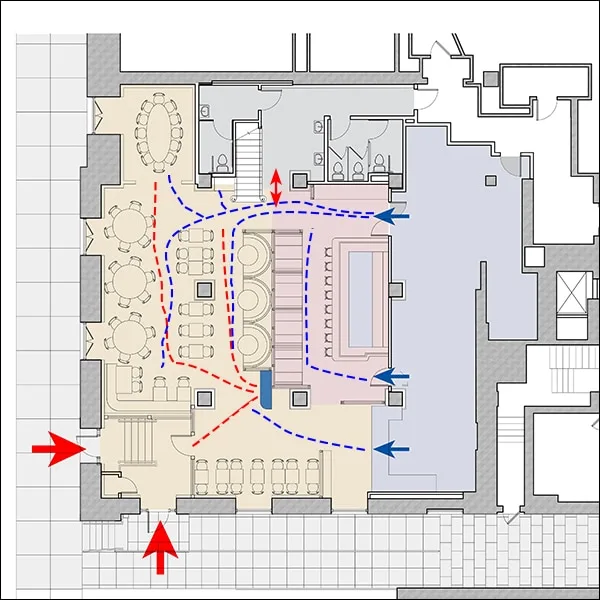
How to Measure Kitchen Traffic Flow for Restaurant Redesigns: Because Chaos Isn’t a Spice
Let me set the scene: It’s Friday night, the dinner rush is in full swing, and your kitchen feels like a pinball machine, except the ball is your line cook, the flippers are swinging trays, and the bumpers are your prep tables. Someone’s shouting for the fryer, another’s elbow-deep in mise en place, and the expediter’s voice is cracking like a teenager’s. Sound familiar? If so, you’re not alone. I’ve stood in enough kitchens, some sleek and humming, others resembling a game of human Tetris, to know that kitchen traffic flow isn’t just some abstract design concept. It’s the difference between a well-oiled machine and a daily disaster.
But here’s the thing: measuring that flow isn’t as simple as eyeballing it or saying, “Yeah, it feels tight.” You need data. Real, tangible, *actionable* data. And that’s where things get tricky. I’ve seen chefs and owners throw money at redesigns based on gut feelings or trendy layouts, only to end up with the same bottlenecks, just prettier. So, how do you actually measure kitchen traffic flow before you rip out counters or relocate the walk-in? That’s what we’re diving into today. By the end of this, you’ll have a toolkit to analyze movement, identify choke points, and redesign your kitchen so it works *for* your team, not against them.
Now, I’m not claiming to have all the answers. I’ve made my share of mistakes, like that time I convinced a client to move their prep station closer to the line because “it looked better,” only to realize during service that the sous chef had to do a 180-degree turn every time they needed a knife. (Spoiler: It did not “look better” after the first ticket.) But I’ve also learned from those mistakes, and from smarter people than me, about how to approach this systematically. So, let’s get into it.
The Why: Why Kitchen Traffic Flow Matters More Than You Think
It’s Not Just About Space, It’s About Time
Here’s a hard truth: Every extra step your staff takes is time stolen from your customers. And in a restaurant, time is money. Literally. If your line cook has to walk 10 extra feet to grab a pan, and they do that 50 times a night, that’s 500 feet of wasted movement. Multiply that by the number of cooks, the number of shifts, the number of days in a year… you get the picture. It adds up. Fast.
But it’s not just about distance. It’s about friction. The more your team has to dodge each other, wait for space, or backtrack, the slower your service gets. And slow service? That’s a one-way ticket to bad reviews, frustrated staff, and a kitchen that feels like it’s running you instead of the other way around. I’ve seen kitchens where the traffic flow was so bad that tickets piled up like rush-hour traffic, and the only solution was to add more staff, which, of course, just made the congestion worse. It’s a vicious cycle.
So, why measure traffic flow? Because you can’t fix what you don’t understand. And if you’re redesigning your kitchen, you’re already investing time and money into making things better. Wouldn’t you rather base those decisions on data than on a hunch? I thought so.
The Hidden Costs of Poor Flow
Let’s talk about the less obvious consequences of a poorly designed kitchen. Sure, everyone notices when the line is backed up or when plates are piling up at the pass. But what about the stuff that flies under the radar?
- Increased accidents: When people are moving too fast in tight spaces, things get dropped. Knives, hot pans, plates, you name it. And every accident is a potential injury or a broken dish. I once worked with a kitchen where the fry station was right next to the prep area, and the number of near-misses with hot oil was terrifying. They moved the fryer six inches to the left, and suddenly, the accidents stopped. Six inches. That’s all it took.
- Staff burnout: No one wants to work in a kitchen that feels like an obstacle course. If your team is constantly stressed because they’re tripping over each other or waiting for space, they’re going to burn out. Fast. And good staff? They don’t stick around for chaos. They’ll find a kitchen that doesn’t make them feel like they’re in a game of dodgeball every shift.
- Food waste: When traffic flow is bad, things get lost in the shuffle. Ingredients get misplaced, dishes get forgotten, and food spoils. I’ve seen kitchens where the walk-in was so far from the prep area that ingredients would sit out for hours, just because no one wanted to make the trek. That’s money down the drain.
- Inconsistent quality: When your team is rushing or working in cramped conditions, mistakes happen. Overcooked steaks, under-seasoned sauces, plates that look like they were assembled by a blindfolded octopus. Poor flow doesn’t just slow things down, it affects the food itself.
So, yeah. Measuring traffic flow isn’t just about making your kitchen look good. It’s about making it work. And that starts with understanding how people move through the space.
Step 1: Define Your Goals (Or: What Are You Even Trying to Fix?)
Before you start measuring anything, you need to ask yourself: *What problem am I trying to solve?* Because if you don’t know what you’re aiming for, you’re just collecting data for the sake of it. And trust me, no one has time for that.
Here are some common goals I hear from chefs and owners:
- “We’re always backed up during peak hours.”
- “Our staff keeps bumping into each other.”
- “We’re wasting too much time running back and forth.”
- “We need to add more stations, but we don’t have the space.”
- “We’re expanding our menu, and the current layout can’t handle it.”
- “We’re renovating, and we want to make sure we get this right.”
Your goal might be one of these, or it might be something else entirely. The point is, you need to define it clearly before you start measuring. Otherwise, you’re just guessing.
For example, if your goal is to reduce bottlenecks during peak hours, you’ll want to focus on measuring traffic flow during those times. If your goal is to reduce accidents, you’ll want to look at high-risk areas (like where people are carrying hot pans or sharp knives). If your goal is to add more stations, you’ll need to map out where those stations could go without disrupting existing flow.
I’ll be honest: This step is easy to skip. It’s tempting to jump right into measuring and mapping, because that feels like progress. But without a clear goal, you’re just spinning your wheels. So, take a minute. Write down what you’re trying to achieve. And if you’re not sure? That’s okay. Start with the biggest pain point in your kitchen. The one that keeps you up at night. That’s your goal.
Step 2: Map Your Current Layout (Because You Can’t Measure What You Can’t See)
The Power of a Simple Floor Plan
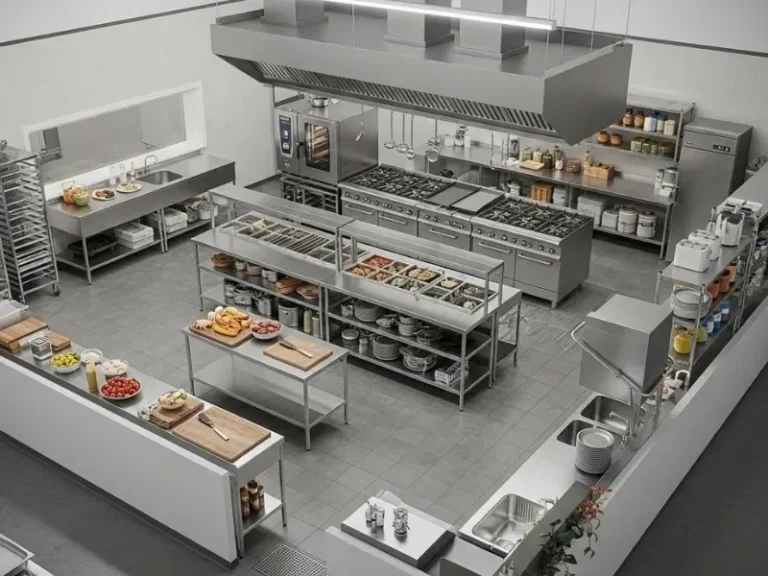
You don’t need fancy software or a degree in architecture to map your kitchen. A basic floor plan is all you need to start. Grab a piece of graph paper (or use a free tool like SketchUp or even PowerPoint) and sketch out your kitchen. Include:
- All major equipment (grill, fryer, oven, prep tables, etc.)
- Workstations (line, prep, dish, etc.)
- Doorways, walkways, and high-traffic areas
- Storage areas (walk-in, dry storage, etc.)
- Any obstacles (columns, low-hanging vents, etc.)
Don’t worry about making it perfect. This isn’t for a design competition, it’s for *you*. The goal is to have a visual representation of your kitchen so you can start tracking movement. I’ve seen kitchens where the owner swore they knew the layout like the back of their hand, only to sketch it out and realize they’d forgotten about a half-wall or a narrow aisle that was causing all the problems. You can’t fix what you don’t see.
If you’re feeling ambitious, you can add measurements. Note the dimensions of each station, the width of walkways, and the distance between key points. This will come in handy later when you’re analyzing flow. But if you’re not sure about measurements, don’t let that stop you. A rough sketch is better than nothing.
Color-Coding for Clarity
Here’s a trick I learned from a kitchen designer: Use colors to categorize your floor plan. For example:
- Red: High-traffic areas (like the path between the grill and the pass)
- Yellow: Moderate-traffic areas (like the path to the walk-in)
- Green: Low-traffic areas (like storage shelves)
- Blue: Problem areas (like tight corners or bottlenecks)
This isn’t just for looks. Color-coding helps you visualize flow in a way that a black-and-white sketch can’t. When you look at your map, you should be able to see at a glance where the congestion is happening. If your entire kitchen is red, well… you’ve got some work to do.
I’ll admit, I was skeptical about this at first. I thought, “Why bother with colors? I can see the problems just fine.” But after trying it, I realized how much easier it was to spot patterns. It’s like when you’re looking at a map and suddenly see a cluster of red pins, you instantly know where the action is. Same principle here.
Step 3: Observe and Track Movement (Or: How to Play Kitchen Detective)
The Art of the Time Study
Now that you have your floor plan, it’s time to track actual movement in your kitchen. This is where things get interesting (and a little tedious). You’re going to play detective, observing how your staff moves through the space during service. Here’s how to do it:
- Pick your time: Choose a time that represents your busiest period. If you’re a dinner-only spot, that might be 6-9 PM. If you’re a breakfast joint, it might be 7-10 AM. The key is to observe during a time when the kitchen is under pressure. If you measure during a slow period, you won’t see the real bottlenecks.
- Grab a notebook (or a tablet): You’re going to be taking notes. Lots of them. I like to use a grid system, where each row represents a staff member and each column represents a time interval (like every 5 minutes). But you can use whatever works for you. The goal is to track who’s doing what and where they’re doing it.
- Follow the action: Pick one station or one staff member to start. Note where they’re moving, how often they’re moving, and what they’re doing. For example:
- 6:00 PM: Line cook #1 moves from grill to pass (10 feet)
- 6:02 PM: Line cook #1 grabs tongs from prep table (5 feet)
- 6:03 PM: Line cook #1 waits for space at the fryer (30 seconds)
- 6:04 PM: Line cook #1 moves to walk-in (20 feet)
You don’t need to track every single movement, just the ones that seem repetitive or problematic. If you notice a cook is constantly backtracking or waiting for space, make a note of it.
I know what you’re thinking: “This sounds like a lot of work.” And you’re right. It is. But here’s the thing: You can’t redesign your kitchen based on assumptions. You need real data. And the only way to get that data is to observe.
Tools to Make Tracking Easier
If you don’t want to do this manually (and let’s be real, who does?), there are tools that can help. Here are a few options:
- Time-lapse video: Set up a camera in a corner of the kitchen and record a time-lapse of service. You can watch it later and note where people are clustering or where movement seems inefficient. Just make sure your staff knows they’re being recorded, no one likes a surprise camera.
- Motion sensors: Some restaurants use motion sensors to track movement in real-time. This is more high-tech (and more expensive), but it can give you precise data on where people are spending the most time.
- Apps: There are apps designed for time studies and workflow analysis. Some popular ones include Toggl Track, Time Study, and Workflow. These can help you log movements and generate reports.
- Good old-fashioned pen and paper: If you’re on a budget, this works just fine. The key is to be consistent and thorough.
I’ve used all of these methods at one point or another, and each has its pros and cons. Video is great for capturing everything, but it can be overwhelming to analyze. Apps are convenient, but they can be pricey. Pen and paper is cheap and flexible, but it’s easy to miss things. My advice? Start simple. Use what you have, and upgrade if you need to.
What to Look For
As you’re tracking movement, keep an eye out for these common issues:
- Backtracking: Are staff members constantly moving back and forth between the same areas? This is a sign that something is in the wrong place. For example, if your prep cook is always running to the walk-in for ingredients, maybe the walk-in should be closer to prep.
- Bottlenecks: Are there areas where people are constantly waiting for space? This could be a narrow walkway, a shared station, or a piece of equipment that’s always in use.
- Cross-traffic: Are staff members constantly crossing paths? This is a recipe for accidents. Ideally, you want a linear flow where people move in one direction (like a conveyor belt). If your kitchen feels like a roundabout, that’s a problem.
- Wasted movement: Are staff members taking unnecessary steps? For example, if your line cook has to walk across the kitchen to grab a utensil, that’s wasted time.
- Idle time: Are staff members standing around waiting for something? This could be a sign that a station is underutilized or that the flow is inefficient.
One thing I’ve learned: The problems aren’t always where you think they are. I’ve seen kitchens where the owner was convinced the bottleneck was at the grill, only to realize after tracking that the real issue was the dish station. The dishwasher was constantly in the way of the line cooks, and no one had noticed because they were so focused on the grill. Don’t assume, observe.
Step 4: Identify Choke Points (Or: Where Your Kitchen Is Failing You)
The Usual Suspects
Every kitchen has its choke points, the areas where traffic jams happen again and again. Some of the most common ones I’ve seen:
- The pass: This is where plates are finalized and sent out to the dining room. If it’s too small or poorly located, it can become a bottleneck. I’ve seen kitchens where the pass was so cramped that plates were piling up, and the expediter was constantly bumping into the line cooks.
- The walk-in: If your walk-in is far from the prep area, staff members are going to waste a lot of time running back and forth. And if the walk-in itself is disorganized, they’ll waste even more time searching for ingredients.
- Shared stations: Stations that are used by multiple people (like a shared prep table or a fryer) can become choke points if they’re not managed well. I’ve seen kitchens where the fryer was constantly in use, and the line cooks were constantly waiting for it.
- Narrow walkways: If your walkways are too narrow, staff members are going to bump into each other. The general rule is that walkways should be at least 36 inches wide (42 inches if you’re dealing with hot pans or sharp knives). But I’ve seen kitchens where the walkways were barely 24 inches, and it was a miracle no one got hurt.
- The dish area: If your dish area is poorly located, it can disrupt the entire flow of the kitchen. I’ve seen kitchens where the dish station was right next to the line, and the dishwasher was constantly in the way of the cooks. Not ideal.
- Equipment placement: If your equipment is poorly placed, it can create choke points. For example, if your grill is too far from the pass, your line cooks are going to waste time running back and forth. If your prep table is too far from the walk-in, your prep cook is going to waste time too.
Now, here’s the thing: Choke points aren’t always obvious. Sometimes, they’re hiding in plain sight. For example, I worked with a kitchen where the real bottleneck wasn’t the grill or the fryer, it was the handwashing sink. The sink was located in a high-traffic area, and staff members were constantly waiting for it. No one had noticed because they were so focused on the “big” stations. But once we moved the sink, the flow improved dramatically.
How to Spot Them
So, how do you identify choke points? Here are a few methods:
- Look for clusters: On your floor plan, mark where people are spending the most time. If you see a cluster of marks in one area, that’s a potential choke point.
- Listen for complaints: Your staff knows where the problems are. Ask them where they feel like they’re always waiting or bumping into each other. They’ll tell you.
- Watch for workarounds: If your staff is constantly finding ways to avoid a certain area (like taking a longer route to avoid a narrow walkway), that’s a sign of a choke point.
- Track wait times: Use a stopwatch to time how long staff members are waiting for space or equipment. If the wait time is consistently high, that’s a choke point.
- Look for accidents: Areas where accidents happen frequently are often choke points. If staff members are constantly dropping things or bumping into each other, that’s a sign of poor flow.
I’ll be honest: This part can be frustrating. You might realize that your kitchen has more choke points than you thought. But here’s the good news: Once you identify them, you can fix them. And that’s where the real magic happens.
A Quick Case Study
Let me tell you about a kitchen I worked with a few years ago. It was a mid-sized restaurant with a pretty standard layout: grill on one side, fryer on the other, prep in the middle. The owner was convinced the bottleneck was at the grill, because that’s where the tickets were piling up. But when we tracked movement, we realized the real problem was the prep table.
The prep table was located in the middle of the kitchen, which sounds fine in theory. But in practice, it was causing all sorts of problems. The prep cook was constantly in the way of the line cooks, and the line cooks were constantly waiting for space at the prep table. Plus, the prep table was too far from the walk-in, so the prep cook was wasting time running back and forth.
The solution? We moved the prep table to the side of the kitchen, closer to the walk-in. We also added a second prep table for the line cooks to use during service. The result? The flow improved dramatically. The line cooks weren’t waiting for space, the prep cook wasn’t in the way, and the tickets stopped piling up. All because we moved a table.
Moral of the story: Choke points aren’t always where you think they are. Sometimes, the solution is simpler than you expect.
Step 5: Measure the Three Key Metrics (Because Data Doesn’t Lie)
1. Distance Traveled
This is the most straightforward metric: How far are your staff members traveling during service? The goal is to minimize unnecessary movement. Here’s how to measure it:
- Use your floor plan to map out the paths staff members take during service.
- Measure the distance of each path. You can do this with a tape measure or by using the scale on your floor plan.
- Add up the total distance traveled for each staff member during a typical shift.
For example, let’s say your line cook travels 50 feet to grab a pan, 20 feet to get ingredients from the walk-in, and 30 feet to drop off a plate at the pass. That’s 100 feet per trip. If they do that 50 times a night, that’s 5,000 feet of movement. That’s a lot.
The general rule of thumb is that any movement over 10 feet is excessive for frequently used items. If your staff is constantly traveling more than that, it’s a sign that something is in the wrong place.
I’ll admit, this metric can be a little depressing. When I first started measuring distance traveled in my own kitchen, I was shocked at how much time we were wasting. But it’s also one of the easiest metrics to improve. Move a station, relocate a piece of equipment, and suddenly, your staff is traveling less. It’s like magic.
2. Time Spent Waiting
This is where things get interesting. Time spent waiting is one of the biggest drains on efficiency in a kitchen. And it’s not always obvious. Here’s how to measure it:
- Use a stopwatch to time how long staff members are waiting for space, equipment, or ingredients.
- Track this over the course of a shift, and calculate the total time spent waiting.
- Look for patterns. Are staff members always waiting for the same thing? That’s a choke point.
For example, let’s say your line cook spends 30 seconds waiting for the fryer every time they need to use it. If they use the fryer 50 times a night, that’s 25 minutes of waiting. Over the course of a week, that’s over 2 hours. That’s a lot of wasted time.
The goal is to minimize wait time as much as possible. Ideally, your staff should never be waiting for space or equipment. If they are, it’s a sign that your flow is inefficient.
This metric is a little harder to measure than distance traveled, but it’s just as important. And the good news is, once you identify the wait times, you can start fixing them. Add a second fryer, relocate a station, or adjust your workflow, whatever it takes to keep your staff moving.
3. Number of Crossings
This is one of my favorite metrics because it’s so telling. The number of times staff members cross paths is a direct indicator of how efficient your flow is. The goal is to minimize crossings as much as possible. Here’s how to measure it:
- On your floor plan, draw lines to represent the paths staff members take during service.
- Count the number of times those lines cross.
- Look for areas where crossings are happening frequently. Those are potential choke points.
For example, let’s say your line cook and your prep cook are constantly crossing paths in the middle of the kitchen. That’s a sign that their stations are poorly located. The solution? Move one of the stations or adjust the workflow so they’re not crossing paths as often.
The ideal number of crossings? Zero. Obviously, that’s not always possible, but the fewer crossings you have, the better your flow will be. I’ve seen kitchens where the number of crossings was so high that it looked like a spiderweb. And guess what? Those kitchens were always chaotic.
This metric is a little more abstract than the others, but it’s incredibly useful. It forces you to think about your kitchen as a system, not just a collection of stations. And once you start minimizing crossings, you’ll be amazed at how much smoother your kitchen runs.
Putting It All Together
So, you’ve measured distance traveled, time spent waiting, and number of crossings. Now what? Now, you analyze the data. Look for patterns. Are there areas where all three metrics are high? Those are your biggest problem areas. Are there areas where one metric is high but the others are low? Those might be easier to fix.
For example, let’s say you notice that your line cook is traveling a lot (high distance), but they’re not waiting much (low wait time) and they’re not crossing paths often (low crossings). That’s a sign that their station is poorly located, but the flow around it is decent. The solution? Move the station closer to the pass or the walk-in.
On the other hand, let’s say you notice that your prep cook is waiting a lot (high wait time) and crossing paths often (high crossings), but they’re not traveling much (low distance). That’s a sign that their station is in a high-traffic area. The solution? Move the station to a quieter part of the kitchen.
The key is to look at the data holistically. Don’t just focus on one metric. Look at all three, and see how they interact. That’s how you’ll get a complete picture of your kitchen’s flow.
I’ll be honest: This part can be overwhelming. There’s a lot of data to sift through, and it’s easy to get lost in the numbers. But trust me, it’s worth it. Once you start analyzing the data, you’ll see patterns you never noticed before. And those patterns will guide your redesign.
Step 6: Redesign with the Golden Triangle in Mind (Or: The Secret to a Smooth Kitchen)
What Is the Golden Triangle?
If you’ve ever read anything about kitchen design, you’ve probably heard of the Golden Triangle. It’s a concept borrowed from residential kitchen design, but it applies just as well to commercial kitchens. The idea is simple: The three most important stations in your kitchen (usually the grill, the sink, and the refrigerator) should form a triangle. The goal is to minimize the distance between these stations, so staff members can move efficiently between them.
In a commercial kitchen, the Golden Triangle usually looks like this:
- Cooking station (grill, fryer, etc.)
- Prep station (where ingredients are prepped and plated)
- Storage (walk-in, dry storage, etc.)
The key is to keep the sides of the triangle as short as possible. The shorter the sides, the less time your staff will spend moving between stations. Ideally, the total distance of the triangle should be no more than 26 feet (that’s the sum of the three sides). If it’s longer than that, your flow is probably inefficient.
Now, I know what you’re thinking: “My kitchen isn’t a triangle. It’s a rectangle. Or a square. Or a weird L-shape.” And you’re right. Most commercial kitchens aren’t perfect triangles. But the Golden Triangle is more of a guiding principle than a strict rule. The idea is to group your most important stations together and minimize the distance between them.
How to Apply It to Your Kitchen
So, how do you apply the Golden Triangle to your kitchen? Here’s a step-by-step process:
- Identify your three most important stations. These are the stations that are used the most during service. For most kitchens, this will be the cooking station, the prep station, and the storage area. But it could vary depending on your menu and workflow.
- Map them out on your floor plan. Draw a triangle connecting these three stations. Measure the sides of the triangle. If the total distance is more than 26 feet, you’ve got some work to do.
- Adjust as needed. If the triangle is too big, look for ways to shorten the sides. Can you move the prep station closer to the cooking station? Can you relocate the walk-in? Can you adjust your workflow to minimize movement?
- Test it out. Once you’ve made adjustments, test the new layout during service. Does it feel smoother? Are staff members moving less? If not, keep tweaking.
I’ll be honest: This isn’t always easy. Sometimes, you’ll realize that your kitchen is so poorly laid out that the only way to fix it is to start from scratch. But even small adjustments can make a big difference. I’ve seen kitchens where moving a single station by a few feet transformed the entire flow.
A Real-World Example
Let me tell you about a kitchen I worked with a few years ago. It was a small bistro with a pretty standard layout: grill on one side, fryer on the other, prep in the middle. The owner was convinced the kitchen was too small, and they needed to expand. But when we mapped out the Golden Triangle, we realized the problem wasn’t the size of the kitchen, it was the layout.
The cooking station (grill) was on one side of the kitchen, the prep station was in the middle, and the walk-in was on the opposite side. The total distance of the triangle was 35 feet-way too long. The line cook was constantly running back and forth between the grill and the walk-in, and the prep cook was always in the way.
The solution? We moved the prep station next to the grill, and we relocated the walk-in so it was closer to both. The total distance of the triangle dropped to 18 feet. Suddenly, the line cook wasn’t running as much, the prep cook wasn’t in the way, and the flow improved dramatically. And the best part? The owner didn’t have to expand the kitchen. They just had to rearrange it.
Moral of the story: The Golden Triangle works. It’s not a magic bullet, but it’s a great starting point for redesigning your kitchen.
Step 7: Test Your New Layout (Because Theory and Practice Are Two Different Things)
Start with a Mock-Up
Before you start moving heavy equipment or ripping out counters, test your new layout with a mock-up. This doesn’t have to be fancy. You can use tape to mark out new stations on the floor, or you can rearrange lightweight items (like prep tables or shelves) to see how the new layout feels.
The goal is to get a sense of the flow before you commit to anything permanent. Walk through the new layout yourself, and have your staff do the same. Does it feel smoother? Are there still choke points? Is anything in the way?
I’ll be honest: This step is easy to skip. It’s tempting to just dive in and start moving things. But trust me, a mock-up can save you a lot of time and money. I’ve seen kitchens where the owner was convinced a new layout would work, only to realize during the mock-up that it was a disaster. Better to find out now than after you’ve already spent thousands of dollars on renovations.
Run a Trial Service
Once you’ve got your mock-up set up, run a trial service. This doesn’t have to be a full dinner rush, it can be a lunch shift or even a practice run with just your staff. The goal is to see how the new layout holds up under pressure.
Here’s what to look for during the trial:
- Flow: Does the new layout feel smoother? Are staff members moving less? Are there still choke points?
- Efficiency: Are tickets getting out faster? Is there less waiting? Is the food quality consistent?
- Safety: Are there any new safety hazards? Are staff members bumping into each other or dropping things?
- Staff feedback: What do your staff think? Do they like the new layout? Do they have any suggestions?
I’ll admit, this part can be nerve-wracking. What if the new layout doesn’t work? What if it’s worse than the old one? What if you’ve just wasted a bunch of time and money? Those are valid concerns. But here’s the thing: You won’t know until you try. And if the new layout doesn’t work, you can always tweak it or go back to the drawing board.
One thing I’ve learned: Your staff will tell you if something’s wrong. They’re the ones working in the kitchen every day, so they’ll notice if the new layout isn’t working. Listen to them. They might have insights you haven’t considered.
Make Adjustments as Needed
Chances are, your first attempt at a new layout won’t be perfect. That’s okay. The goal is to iterate. Make adjustments based on what you learned during the trial service, and test again. Keep tweaking until the flow feels right.
For example, let’s say you moved the prep station closer to the grill, but during the trial, you realized the prep cook was still in the way of the line cooks. The solution? Move the prep station to the other side of the grill, or adjust the workflow so the prep cook isn’t working during peak hours.
The key is to be flexible. Don’t get too attached to any one layout. The goal is to find what works, not to prove that your initial idea was right.
I’ll be honest: This part can be frustrating. It’s easy to feel like you’re going in circles, making the same adjustments over and over. But trust me, it’s worth it. The more you test and tweak, the closer you’ll get to the perfect layout.
Step 8: Implement the Changes (Or: How to Actually Get This Done)
Start Small
If you’re redesigning your entire kitchen, it’s tempting to try to do everything at once. But trust me, start small. Make one change at a time, and see how it affects the flow. If it works, keep it. If it doesn’t, tweak it or go back to the drawing board.
For example, let’s say you want to move the prep station closer to the grill. Start by moving just the prep table. See how that affects the flow. If it works, you can move the rest of the prep station later. If it doesn’t, you haven’t wasted time and money moving everything.
The key is to test as you go. Don’t wait until everything is moved to see if it works. Make one change, test it, and then move on to the next.
I’ll admit, this approach takes patience. It’s tempting to just rip everything out and start fresh. But trust me, small changes add up. And they’re a lot easier to undo if something goes wrong.
Get Buy-In from Your Staff
This is one of the most important steps, and it’s one that’s easy to overlook. Your staff needs to be on board with the changes. If they’re not, they’ll resist, and the new layout won’t work.
Here’s how to get buy-in:
- Explain the why: Tell your staff why you’re making the changes. Explain how it will make their jobs easier and improve the flow of the kitchen.
- Involve them in the process: Ask for their input. What do they think of the new layout? Do they have any suggestions? The more involved they are, the more invested they’ll be in the changes.
- Train them: Make sure your staff knows how to use the new layout. Walk them through it, and answer any questions they have. The last thing you want is for them to revert to old habits because they don’t understand the new system.
- Be open to feedback: After the changes are implemented, ask your staff how it’s going. Are there any issues? Do they have any suggestions for improvement? Listen to them, and be willing to make adjustments.
I’ll be honest: This step can be tricky. Some staff members will be resistant to change, no matter how much you explain the benefits. But the more you involve them in the process, the more likely they are to come around.
Monitor and Adjust
Once the changes are implemented, don’t just set it and forget it. Monitor the new layout closely, and be ready to make adjustments as needed. Here’s what to look for:
- Flow: Is the new layout working as intended? Are there still choke points?
- Efficiency: Are tickets getting out faster? Is there less waiting?
- Staff feedback: What do your staff think? Do they like the new layout? Do they have any suggestions?
- Customer feedback: Are customers noticing a difference? Are they getting their food faster? Is the quality consistent?
If something isn’t working, don’t be afraid to make changes. The goal is to find what works, not to stick with a layout that isn’t working just because you’ve already invested time and money into it.
I’ll admit, this part can be humbling. It’s easy to get attached to your ideas, especially if you’ve put a lot of time and effort into them. But the best chefs and owners are the ones who are willing to admit when something isn’t working and make changes. So, be open to feedback, and be willing to adjust as needed.
Step 9: Document Everything (Because You’ll Forget)
Why Documentation Matters
Here’s a hard truth: You will forget. You’ll forget what the old layout looked like. You’ll forget what changes you made. You’ll forget what worked and what didn’t. And if you don’t document everything, you’ll be starting from scratch the next time you want to make changes.
Documentation isn’t just for your future self. It’s also for your staff, your investors, and anyone else who needs to understand your kitchen’s flow. Here’s what to document:
- Floor plans: Keep copies of your old and new floor plans. Note any changes you made, and why you made them.
- Data: Keep track of the metrics you measured (distance traveled, time spent waiting, number of crossings). Compare the old and new data to see how the changes affected the flow.
- Feedback: Document any feedback you received from staff or customers. What did they like about the new layout? What didn’t they like?
- Lessons learned: Write down what you learned from the process. What worked? What didn’t? What would you do differently next time?
I’ll be honest: This step is easy to skip. It’s tempting to just move on once the changes are implemented. But trust me, documentation is worth the effort. It will save you time and headaches down the road.
How to Document
You don’t need fancy software to document your kitchen’s flow. Here are a few simple methods:
- Notebook: Keep a notebook where you jot down notes, sketches, and data. This is the simplest method, but it’s also the easiest to lose track of.
- Spreadsheet: Use a spreadsheet to track metrics, feedback, and lessons learned. This is a great way to organize your data and compare old and new layouts.
- Photos and videos: Take photos and videos of your kitchen before and after the changes. This is a great way to visualize the differences.
- Digital tools: There are tools designed for kitchen design and documentation, like KitchenDraw or 2020 Design. These can be expensive, but they’re worth it if you’re doing a major redesign.
I’ll admit, I’m not always great at documentation. I get excited about the changes, and I want to move on to the next thing. But I’ve learned the hard way that skipping this step is a mistake. So, do as I say, not as I do. Document everything.
Step 10: Rinse and Repeat (Because Your Kitchen Is Never “Done”)
The Kitchen Is a Living Thing
Here’s the thing about kitchens: They’re never “done.” Your menu will change. Your staff will change. Your customer base will change. And as those things change, your kitchen’s flow will need to adapt.
That’s why it’s important to revisit your kitchen’s flow regularly. Every six months or so, take a step back and ask yourself: Is this still working? Are there new choke points? Are there areas that could be more efficient?
I’ll be honest: This can feel like a never-ending process. It’s easy to get frustrated when you realize that the layout you just spent months perfecting is already outdated. But that’s the nature of the beast. The best kitchens are the ones that evolve with the needs of the business.
How to Keep Improving
So, how do you keep improving your kitchen’s flow? Here are a few tips:
- Stay curious: Always be on the lookout for new ideas and innovations. Read industry blogs, attend trade shows, and talk to other chefs and owners. You never know where your next great idea will come from.
- Listen to your staff: Your staff is on the front lines every day. They’ll notice problems and opportunities that you might miss. Listen to them, and be open to their suggestions.
- Track metrics: Keep measuring distance traveled, time spent waiting, and number of crossings. Compare the data over time to see how your kitchen’s flow is evolving.
- Experiment: Don’t be afraid to try new things. Move a station, adjust your workflow, or test a new piece of equipment. The worst that can happen is you learn something.
- Document everything: Keep track of what works and what doesn’t. That way, you won’t have to reinvent the wheel every time you want to make a change.
I’ll admit, this part can be exhausting. It’s easy to feel like you’re always chasing the perfect layout. But here’s the thing: There is no perfect layout. There’s only the layout that works best for your kitchen, right now. And that’s enough.
A Final Thought
At the end of the day, measuring and improving your kitchen’s traffic flow is about respect. Respect for your staff, respect for your customers, and respect for the craft of cooking. A well-designed kitchen isn’t just more efficient, it’s a better place to work. And when your staff is happy, your customers are happy. And when your customers are happy, your business thrives.
So, take the time to measure your kitchen’s flow. Identify the choke points. Make the changes. And keep improving. Your staff, your customers, and your bottom line will thank you.
Now What? Your Action Plan for a Smoother Kitchen
Alright, let’s bring this home. You’ve read through all the steps, you’ve taken notes, and now you’re probably thinking, “This is great, but where do I even start?” I get it. It’s a lot to take in. So, here’s your action plan-a step-by-step guide to measuring and improving your kitchen’s traffic flow, without getting overwhelmed.
First, don’t try to do everything at once. Pick one thing to focus on this week. Maybe it’s sketching out your current floor plan, or maybe it’s tracking movement during a single shift. Whatever it is, start small. The goal is to build momentum, not to overhaul your kitchen in a day.
Second, involve your team. This isn’t a solo project. Your staff knows your kitchen better than anyone, so ask for their input. What do they think is working? What’s driving them crazy? You might be surprised by what they say. And when it comes time to test a new layout, their buy-in will be crucial.
Third, embrace the mess. Redesigning your kitchen isn’t a linear process. You’ll try things that don’t work. You’ll make mistakes. You’ll have moments of doubt. That’s okay. The best kitchens are the ones that evolve, not the ones that are perfect from day one. So, give yourself permission to experiment, to fail, and to learn.
Finally, remember why you’re doing this. It’s not just about efficiency or speed. It’s about creating a kitchen that works for your team, so they can do their best work. It’s about reducing stress, preventing accidents, and making your kitchen a place where people actually want to work. And when your kitchen runs smoothly, your customers notice. They get their food faster, the quality is consistent, and they leave happy. And happy customers? That’s the goal.
So, what’s your next step? Maybe it’s grabbing a notebook and sketching out your floor plan. Maybe it’s talking to your staff about their biggest pain points. Maybe it’s setting up a camera to record a time-lapse of service. Whatever it is, do it this week. Because the sooner you start, the sooner you’ll see results.
And hey, if you get stuck, don’t hesitate to reach out. I’ve been there, and I’m happy to help. Because at the end of the day, we’re all in this together. We’re all trying to create kitchens that work, not just for our businesses, but for the people who make them run. And that’s something worth striving for.
FAQ: Your Kitchen Traffic Flow Questions, Answered
Q: How long does it take to measure kitchen traffic flow?
A: It depends on the size of your kitchen and how detailed you want to get. For a small kitchen, you could do a basic observation in a single shift. For a larger kitchen, it might take a few days to track movement, identify choke points, and gather data. The key is to observe during your busiest periods, so you’re seeing the kitchen under real pressure. Don’t rush it, better to take a little extra time and get accurate data than to rush and miss something important.
Q: Do I need special tools or software to measure traffic flow?
A: Not at all. While there are tools like motion sensors, time-lapse cameras, and workflow apps that can help, you don’t need anything fancy to get started. A notebook, a stopwatch, and a basic floor plan are enough to begin tracking movement and identifying problems. If you want to get more advanced, you can invest in software later. But for most kitchens, the low-tech approach works just fine. The most important tool you have is your own observation skills.
Q: What’s the biggest mistake people make when redesigning their kitchen?
A: The biggest mistake I see is redesigning based on assumptions instead of data. It’s easy to look at a kitchen and think, “This station should go here,” or “This walkway is too narrow.” But without tracking movement and measuring traffic flow, you’re just guessing. I’ve seen kitchens where the owner was convinced the bottleneck was at the grill, only to realize after tracking that the real problem was the dish station. Don’t assume, observe. The second biggest mistake? Not involving the staff. Your team works in the kitchen every day, so they know where the problems are. Ignore their input at your peril.
Q: How do I know if my new layout is actually working?
A: The best way to know is to measure the same metrics you tracked before the redesign. Compare the distance traveled, time spent waiting, and number of crossings before and after the changes. If the numbers have improved, your new layout is working. But don’t just rely on data, ask your staff for feedback. Do they feel like the kitchen is running smoother? Are there still choke points? Are they happier with the new layout? Finally, pay attention to customer feedback. Are tickets getting out faster? Is the food quality consistent? If the answer is yes, you’re on the right track. If not, it’s back to the drawing board.
@article{how-to-measure-kitchen-traffic-flow-for-restaurant-redesigns-a-step-by-step-guide-to-efficiency,
    title   = {How to Measure Kitchen Traffic Flow for Restaurant Redesigns: A Step-by-Step Guide to Efficiency},
    author  = {Chef's icon},
    year    = {2026},
    journal = {Chef's Icon},
    url     = {https://chefsicon.com/how-to-measure-kitchen-traffic-flow-for-restaurant-redesigns/}
}